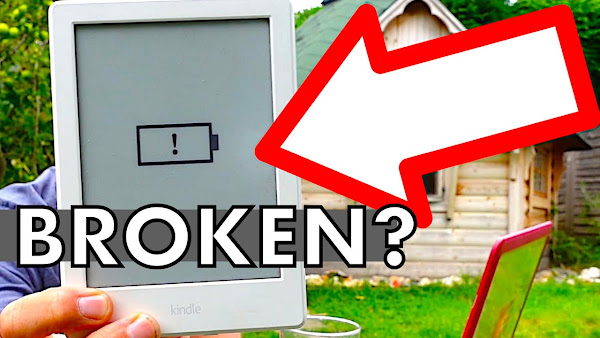
0:00 How to fix a bricked KINDLE : Amazon Kindle not charging, stays on battery logo
1:00 Method 1: Reset Kindle by removing some books from your Amazon account, to trigger a sync to your Amazon Kindle
2:40 Method 2: Fix your Amazon Kindle by charging it from a laptop not a wall charger
TRANSCRIPT: (CLICK PLAY ON THE VIDEO ABOVE)
THIS IS THE TRANSCRIPT - CLICK PLAY ON THE VIDEO ABOVE!
hello I’m Neil welcome back to the happy hut
this is the dad delivers vlog where we try to be happy with what we've already got
and we've already got this
it's an Amazon Kindle but we're not happy with it because look
it has bricked!
it has completely tanked
it has stopped working
it's a Kindle paperwhite and nothing removes this horrible icon of doom gloom and death
is this device dead
I’m going to try and fix this using only my laptop and if this has happened to you too I’m so sorry
we've only had this like two years
but there might be a way to fix this
my Kindle is actually my... it's actually my wife's Kindle
but her Kindle is only showing a battery icon with a exclamation mark
as you can see I don't know if you can see in the daylight
there is a nice battery charging light
but nothing happens
it doesn't turn green and it just... it just stays dead
it's completely bricked
this Kindle has just stopped working
so thanks for coming along with the ride of the jeopardy with me
so this is my wife's Amazon home page
I’ve obviously blanked out some crucial details because goodness forbid that you would actually order some stuff for us
probably do less damage than we do with it
if I zoom in on the left hand side you can see this hamburger menu icon
the three lines in a row there
that indicates this menu
and if I scroll down you can see digital content and devices
I’m going to go down to Kindle e-readers and books
click on that but I’m going to go all the way down to manage your content and devices
now this has opened up the list of books on my wife's dead Kindle
I wonder if all of these books might have crashed this Kindle
I’m going to remove the ones I know she's not going to read
so let's try this one and this one
I’ve selected just two random books and I’m hoping changing the account will somehow force Amazon to try and contact this device
so if I hit delete here and this deletes them from my wife's Kindle’s library
by the way you get to see a little glimpse into mine and my wife's reading history
yeah make of this what you will
whoa the next thing I need to do is to come indoors
this is where I’ve got wi-fi connection to the... the Kindle
and the next thing we need to do is to press and hold down the power button for a long time so I’m going to try that and see if that somehow reboots it
and let go of the power button
which isn't worked at all
what a waste of time
okay so that didn't work but there's another solution that apparently does work and it means that I’ll be slightly less grumpy and it involves plugging this into your computer to charge it up rather than into a wall socket
if you plug in your Kindle to your computer - it charges at a different voltage and if you leave it on charge for about half an hour in a computer sometimes that helps
if you can hold down the power reset button for about 45 seconds
and we've got the charge light on so that's a good sign
I’m going to leave this for half an hour
so we just got back from the park and you will never guess what's happened
haven't got my microphone on - I’m sorry I think you can guess what happened
it worked!
it's brought the Kindle back to life
yeah look by plugging it into a computer it charges it at a different voltage there's some kind of block from using a wall charger
so while my family are arguing about whether an Asus Chromebook is a mum computer
I will celebrate the fact that I have somehow managed to fix her Kindle
there's all kinds of rows kicking off here now
if this has helped you please hit a thumbs up so that other people can find this video too and if it hasn't leave a leave a comment because I’m sure people down below will be able to help you with your broken Kindle
oh man I’ve got Bolognese on the back of my paperwhite
We got kicked off the Laser Blaster ride when it broke down... and... er that's it. No free ride, voucher, or even a drink. If it breaks down, can you please get off and walk over there please, thank you.
The staff were very polite and excellent and kept us safe for which we are grateful.
This is obviously going to come off as entitled or privileged but... isn't this a chance for the Legoland® Windsor Resort procedure to delight a bunch of people who queued a long time?
Or paid quite a bit of cash for the experience?
Look at our 100% hubris assuming we'd get something for this!
How do you set the time and timer programme on a Vaillant boiler remote control, for something like the Vaillant EcoFit Pure central heating boiler?
I show you how I set the time and date on my Vaillant boiler VRT350f remote control for my Vaillant Ecofit Pure boiler... then I set the timer program to control my central heating through the week. We'll also look at the different kinds of timer programmes we can set.
0:00 How to set VAILLANT boiler timer program & time - remote control VRT350f Ecofit pure central heating
0:10 How to change the time and date on Vaillant boiler remote control
2:10 How to set the timer programme on Vaillant boiler remote control VRT 350f for Ecofit pure Vaillant boiler
TRANSCRIPT: (CLICK PLAY ON THE VIDEO ABOVE)
THIS IS THE TRANSCRIPT - CLICK PLAY ON THE VIDEO ABOVE!
I’ve got my Vaillant remote control the VRT 350f
I only know it's called that because of this manual that I’ve also got
we are going to set the date first
so we'll go to the menu and you hit menu
which is the button on the left
and then we want to turn the dial so this dark block highlights basic settings
you have to turn it down and down and down so you see from the top it's not showing so you go down to basic settings then press the select button on the right hand side
and guess what it's date and time
press select
and the dial when you turn it, it jumps the cursor the black block around the different numbers that you can change
so for the dates, the date today is the seventh of February so seven is okay and then we'll turn the dial to highlight this five - which is wrong - and then I’ll press this button here to select change
and you can see the black block is flashing - the cursor is flashing - and I’ll turn that all the way around, or back, to February which is two
then hit ok and this number on the end is the year
so we're going to change that to 2021. nearly said 2020.
there we go press ok
now we can set the time and that's in the same place here
the time now is 1707.
so I just need to turn this - this dial takes it all the way up to 23 and all the way down to zero
so I want to change that to - it's five o'clock so that's 17 - and then I’ll hit ok to move it onto the next number and then we'll take that back to 07.
it's taking so long let's make it eight
1708
then I’ll hit okay and it offers to have daylight saving or not
in the UK that's basically changing between British summer time and GMT basically to set your summer time for the boiler to automatically change the clock
I’m going to hit okay
we've set the date and time on the Vaillant boiler remote control
I’m gonna try and set the timer now!
so this could take some time
the first timer that I want to set - I want the heating to come on at six in the morning and go off at eight o'clock in the morning - and I want to do that every day Monday to Sunday so that's what I’m going to set
there are other timer programs that you can set and the details for those are in my other video - the really big long video and that link is in the description
first we need to press the menu button on the left hand side
and then we'll turn the dial to highlight the cursor over time programmes
and I’ll hit select and “heating 1” is the program for all of our heating so I’ll select that
press select
and here if I go through the dial - you can see that there's a timer program for Monday Tuesday Wednesday Thursday Friday
all the way through to Sunday
and then the next timer program is for Monday to Friday
then Saturday and Sunday - there's a timer program for that
and finally there's a timer program for Monday to Sunday - all the way through the week
that is the timer program that we want to set and then once we've done that I’ll go back and delete all of the others, because the others will take priority over this basic daily program
so we're gonna set Monday to Sunday first
and you can see already it's set for six o'clock to seven o'clock
we want to change that to eight o'clock
so to go into the Monday to Sunday program, I’m going to hit select
and it's highlighted six o'clock - that's good that's what we want
so let's turn the dial to move over to seven o'clock and I’ll hit change which is this button here
and it's flashing so I can turn the dial and it goes up in ten minute increments
we'll take that to eight o'clock
hit okay
now I only want two timers.
I want one in the morning and one in the evening, and there are three slots
so we don't want to use three slots we only want to use two slots
and the way to keep the slot empty or blank is to just set the same time, so it start stops on the same time so it doesn't exist
so here on period two we've got 12 o'clock to 12 o'clock
that's great because that will leave it blank for us
so hit cancel and then we're gonna turn the dial down to period three...
right this is the timer program for the evening
now it gets cold about five o'clock
I’m a tightwad though - so what should we say
I’ll call it 5 30.
I’ll be kind to the family we've only got like one month of coldness surely
so to change the 1830 to 1730, I’m going to press change
so the time flashes
and then I’m going to turn the dial back to 1730
and then I’ll hit ok
that takes us on to 9 o'clock
I think that seems quite reasonable!
should I call it 9:30? I’ll call it 9:30 because then the radiators will cool down
maybe everyone will go to bed
so I’ll just turn the dial to 21.30 then I’ll hit ok
which is great so that means my Monday to Sunday timer program is set
it's going to come on at six o'clock go off at eight o'clock and the same at 5:30 and go off at 9:30.
so if I hit back that takes us back to the timer programs
now these daily programs they're going to override what I’ve just set
you can see that Monday Tuesday Wednesday Thursday Friday have the same time
so that's great
starts at six and comes off at eight
so that is how to set your Vaillant boiler remote control timer program for a regular on off time in the morning and evening from Monday through to Sunday
if you want to change any of the individual days - or Monday to Friday - or have something different at the weekend - you can do exactly the same thing by going into the menus for Saturday and Sunday for instance
Monday to Friday
or any of the individual days of the week
and I hope you managed to get your boiler going
say hi in the comments
it'll be lovely to hear from you
and if you're feeling even kinder I’m trying to get this channel to 1000 subscribers
you don't have to watch any of my videos ever again but if you hit the subscribe button you take us one step closer to YouTube paying us for these videos
we really appreciate it
we'll be able to buy some heat from YouTube!
and good luck with staying warm with your Vaillant boiler remote control
Part 2 of my Self-Isolation vlog... Still can't taste or smell anything, which means I can eat ANYTHING... and still getting phone calls from Test and Trace...
THIS IS THE TRANSCRIPT - CLICK PLAY ON THE VIDEO ABOVE!
Raw onion?
yeah sure why not
yeah
okay
ready?
go on
Hello it's day six since the uh - let’s take this off
it's day six since the symptoms of the Rona came to visit me
did the... the test this morning I don't know if you can see it there but the...
the second line is really faint
I mean it's barely coming through
The self isolation is really really starting to hit
I noticed - so I made a video - just bringing you up to speed - I tested positive for the Rona and I released this video here um where it shows everything
where I lost my taste and smell and then took the family to a PCR test which was stupid because they were all negative
there we are all in the car breathing in my air
luckily they're all still negative and as you can see I took the test this morning and the second line is really really faded now
you've got to really hold it up to the light to see that second line
so this morning I’m feeling less delicate but I’m just feeling really uh fatigued and I’ve got a feeling that tiredness is... it's just from not moving
it's from not being out and about because of the self-isolation
so look I’ll put it on the screen now
I’ve done 14 steps today
these are the steps that my phone has measured and you can see right here on the Monday there I am like a good’un nearly hitting the 10k steps and then plummet
absolutely nothing all week and that's got to take a toll
I mean obviously I’m not a GP or a medical person in any sense but even I can see that even if you're super fit and healthy and have no symptoms of the Rona...
if you're gonna just be indoors and not move for two weeks that's gonna take an incredible toll on your body and looking at these steps I have no idea how I’m doing 1300 steps a day by just moving between the bathroom and the bedroom
I think it's just pacing up and down with the camera like this
I’m also going around the house with a mask on and everywhere I go I’m [COUGH] excuse me
I’m sanitizing... I’m wiping things down as I’m using them
honestly it's like going around your house like a high-end burglar from a heist movie
you know you're just constantly wiping all elements of your trace from your own home
It’s not a good way to live
and probably the... the hardest thing at the moment for anyone who's been through this you'll know this but the ah the... the taste and the smell
I just miss the taste and the smell so much
I was going to film myself eating a raw onion and maybe some of Casper’s dog food
should we do it?
should we do it? I’ll get my son to film it
how should I do this
sorry about the noise in the background but my poor long-suffering wife is mowing the garden
I think you should just chop it into quarters and then eat it like um oranges
can you literally not taste a thing?
I literally can't taste a thing
well this is the test
I can't smell it
oh that'd be really weird because you just can't taste anything
right
I kind of rather not to taste anything because then I could like eat lots of healthy stuff can I?
right well that's what I thought
I could eat whatever I want
this is gonna test whether it would work or not
should I do it
sure why not
uh yeah sure why not
yeah okay ready?
go on
Right you can't taste that!
really?
it feels really tingly
we need lights on in here because the quality is quite bad
so I’ve just done that for nothing?!
because my phone doesn't work well in the dark
this is wrong the taste is coming back!
I can taste it!
I can really taste it now!
so did your covidjust stop the second you did that?
It’s brought back my taste!
What have you done?
You’re so stupid!
It’s brought back the taste of onion
Shall I eat dog food?
Sure, there’s some fresh stuff down there
he's probably put his mouth in that and he's got a littlecovid
[DOG COUGHING]
he has!
I’ll probably catch the dog... get dogCovid
So I can't taste it, but it doesn't feel good
they feel like soggy biscuits
that's because he's put... he’s licked it all
You disgusting person!
Oh look the dogs running over
He wants some
I’m sorry Casper I was eating... I was eating your dinner
He gets so mad if you did that
right so here's what I’ve learned if you've lost your taste and smell eat raw onion because it will cut through
do you think yourcovid just literally just stopped now
instantly went away the second you eat an onion
but theCovid just went No, I’m out of here you can get taste and smell back, we’re off!
I’m calling on behalf of the NHS Track and trace
Hiya I’m calling to talk about your self-isolation
how have you been feeling
uh delicate and bit rough but good thanks
oh good oh sorry not good but
no it is!
you're right it's fantastic
I can walk around I can't taste anything still
I just tasted a little bit
I’m very grateful thank you
and can I confirm you’re self-isolating
I am
perfect
because I’m just really interested and I’m extremely bored as well because I’m I’m indoors but do you phone people can you... and you can you tell if they're not self-isolating
is it if you ever phone someone it's like really obvious that they're out somewhere?
yeah yeah of course but um because we could tell by like you can hear the cars it might be in the garden sometimes you see the radio on their car and like beeping like you can completely tell they’re in a car
yeah we just have to go from what you say to be honest because we haven't got a camera
we can't really see where you are
yeah what would you because I’ve been asking this everyone who's phoned me
what what would you do at one minute past midnight on your first day of freedom
I’m looking for ideas
at midnight?
that's a good pub
Some open late don't they
yeah well it's better than my idea
I think it's gonna be a BP garage
that's the only place that's open around here
oh yeah there you go, bring a little speaker
thank you so much for your time today and thank you so much for self-isolating and I hope you have a lovely day
oh you too thank you for the call appreciate your work
Tested Positive for The Rona... What does that mean for the family? What happens next? How many texts, emails and phonecalls will I get from NHS Test and Trace?
When will the 10 days self-isolation actually end?
TRANSCRIPT: (CLICK PLAY ON THE VIDEO ABOVE)
THIS IS THE TRANSCRIPT - CLICK PLAY ON THE VIDEO ABOVE!
hello I’m Neil and I just scored a positive result!
Ta-daah!
what do I win
oh man it feels like um really bad man flu and uh I’ve not been vlogging after
- this is called the dad delivers vlog where we try to be happy with what we've already got and according to this lateral flow test I’ve got I might have got something
I’ve not been vlogging very much and maybe this is the time to uh to get back into the vlog
so I had a negative result two days ago
and then a negative result yesterday
and then last night I was just - I just I was cooking for a change and I just suddenly lost all sense of taste and smell
did a test that was negative uh one of these
woke up this morning and thought I’d give it another test and and this is how it's come up
it was a bit of a shock to see that first stripe popping up
it popped up instantly
so I just feel really blocked up like I don't want to be in my own body
it's man flu
basically I’ve tested positive for man flu 19
when I lost my taste and smell I booked an appointment for the PCR test site this morning
and now we're going as a family!
yeah fun time dad
fun time
you gotta be positive
yeah
so we're all on our way now to a family trip to the PCR centre
Ray!
Reh!
and what I don't understand and clearly I’m not an expert but I’ve got one of the symptoms
I’ve had a positive lateral flow test and yet the government advice is that all of you you don't have to self-isolate at all
you can still go to school!
I... I don't quite understand
so just to add to the sense of drama and anticipation... there's a fire drill at one of the businesses at the business park
as well as this Threads-like... we got an audience!
that's not good
there are too many yeah yeah there are too many hi-vis vests!
Just one?
um there's four of us actually
I’ll go on the number plate because there's so many
Who wants hand sanitizer?
oh okay
so I touched... the swab touched my tongue I’m going to get another one
we've got the uh the hazard lights are on but no one's coming yet
it's quite busy
I dont know why you cant open the window - it’s ridiculous
There’s nobody here and we're passing it around amongst others
can we turn this off now?
Do you want to film the people going back
and these are the people going back from their fire drill back to their work
MUM: Ah, thank you for checking me out!
that's like school I’d literally do the exact same
And they’re all walking past while Mum’s got a swab up her nose!
they're all looking at you
a couple of people just like... just pointed he's just pointed
he's saying “look, we might have a fire drill...” and look I’m gonna have to...
Look we're being filmed! he's talking to his friend he's like “look we're being filmed!”
Look there's a old lady sticking a thing up her nose look look
he's like oh huh
okay you take the papers
oh Neil they’ve got to go together
they havent!
So that went well!
open the windows now
so if you haven't got it, being in a car with the windows wound up probably isn't going to help.
Yeah dont go with the one who tested positive
right
I think I preferred the walk-in one we went to do you remember?
which one did you prefer
I dont care
oh
I like the other one because it looked really bleak and it was like um pylon there and nobody else there
it's like some kind of zombie apocalypse thing situation
it could not have made it look more bleak
it's time now to get our results!
hello it's day two of the vlog and the covid-ness the Rona-ness
I thought the video would end right here with me showing you my my my results which I’ve got on screen there
yep it's positive
the rest of the family are all bizarrely negative and looking over the footage from yesterday I’m a bit shocked
we weren't really thinking straight
so I had a positive test result the family had negative test results
why we... why are we getting into a car and being in an enclosed space for an hour
I hadn't quite thought that through
I think we just all assumed that we all had it
anyway so this morning it's confirmed that the rest of the family - my kids my long-suffering wife are negative - and I’m positive
what I wasn't expecting was the wave of administration that you've got to do now
probably at a time when you're not feeling great as well but it's got to be done
but it's asking me questions like have I had a vaccine
it's like you're the NHS!
you've got you've got my details! so I’m answering these questions for things that I’d hope the NHS system would already know
so anyway vaccine it's now asking me for the date of my first dose
why am I putting this information in when the NHS is the organization that arranged the vaccine for me so I don't understand why as part of this test and trace I’ve got to put in information that the NHS you'd think would already know
anyway let's stick with it try and stay positive
yeah
what... what type of vaccine did you have
you you gave it to me!
I think the hardest thing with doing this vlog apart from feeling a bit rough or very rough um I’m trying to not get angry about the system and it takes a bit of energy to keep things in perspective
so now I’m walking around the house wearing a face mask
hello day three and I’m basically locked in the bedroom now
the rest of the family are going about their lives in their negativity
I’m still staying positive but I’m gonna find out if I am actually positive still
I wanted to see if a lateral flow test would show uh what it would show
time to jam one of these up my hooter
I’ve still got - you probably can't see it - but I’ve still got really red eyes really ah pink pink eye
[SNEEZING]
the line that shows that you're positive is taking a while to emerge and when I when I took it two days ago it just appeared instantly
but I thought it was quite interesting that you know maybe it's a sign that I’m slightly less infectious? I don't know?
the lines come through but it took a while it's so much fainter than my first test can I find my first test I look at the difference
so that was when I first noticed the morning after my symptoms on day three
the line... the line's fainter I don't know if that means anything
I think the best way to describe the feeling at the moment is it's delicate
hello so it's day four and um the hardest part is is the taste and smell it's oh sorry I’ve got my got my lunch
so this is my lunch
I can literally eat anything at the moment because I can't taste a thing and my sense of smell isn't as good as young casper here
casper's got a cough too!
he's had it the whole time that um the family have
[DOG COUGHING]
just a bit of a coincidence do you think do you think you've got The Rona?
so he's just here for the for the frankfurters which I can't taste I should um try to make money from this somehow and write a cookbook
“what to eat when you're down with The Rona” because basically that's a recipe book where you could put in literally anything
these are really strong tasting but I can't sense a thing
it's day five and I can see I can see that second line emerging
hey casper
They shut the door before I could see him!
Casper!
good luck at the football! who are you playing today?
Oh, a friendly match!
yeah it's definitely taking longer each day for the second line to emerge but the second line is definitely emerging
I’ll line it up along with the... the other ones
so that's my little collection
my son had a go at making one to see if he could get out of school it was almost convincing but not quite
last night I got bored in my confinement so I thought I could use the natural flow test for some kind of creative or artistic project
I think we've all tried this right?
the the The Rona domino rally action alley?
I don't know if I can keep this going for five days
I’m starting to not take the confinement not very well
I really really miss going somewhere I just missed I miss going to the lidl
I miss just pointlessly wandering around with a podcast
I need to plan something put in the comments where you think I should go and maybe I could actually do one of them
hello hello hello hi can I speak to Neil Mossey please?
speaking
hi Neil my name's Laila I’m just calling on behalf of the NHS test and trace
just a give you a quick call to check up on you and talk about your self isolation and that this call is being recorded for training and quality purposes
are you free to talk right now
I am so we're both aware that this call is being recorded then and that's okay
Yes sir that’s fine
So you're okay with it?
how are you feeling today Neil bit rough but good thank you for asking and can I just confirm that you are intending to continue to self isolate
I’m in my bedroom now
I’m sick of it
okay perfect um so that's really it before I go I just need to remind you that you do need to remain in self isolation for ten days after the date that you developed symptoms or tested positive even if you were showing no symptoms as it is a legal requirement now for you to stay at home and self isolate which I already know that you're doing so that's not a problem
I just want to say thank you for your time today Neil and of course with self isolating we know that you're having to make a sacrifice so stay at home during this time however you are helping stop the spread of the virus so thank you so much
before I end the call are you clear about everything I have discussed with you today
I’m not can I just ask a question please
do you have any ideas of where I could go at one minute past midnight
what would you... where would you go where would you go on your first minute of freedom from the house with a family driving you nuts and avoiding you
isn't that... it’s up to you sir!
I don’t know a bar, a club, whatever
that sounds good I was gonna - I was gonna go tesco express but your idea sounds better!
In the car park. Enjoy it there.
maybe mcdonald's drive through I don't know
Any other questions?
no that's uh really helpful thank you and can I also ask, don't...
forgive me you don't have to answer this... but your job is to to basically call and give this reminder?
so we make isolation follow-up calls yes sir on the fourth day of isolation on the seventh day of isolation and on the 10th day of isolation
just to check up on the individual
understood understood understood
So the next call will be on day seven
yeah on the 19th sir
ah wonderful that's really interesting thank you so much
it's okay sir, I hope you have a nice day
you too - thank you thank you bye bye - thank you for your work
so the official advice... the OFFICIAL advice from test and trace themselves is that they would go to a bar - you don't have to do this it's up to you - but they would go to a club or bar one minute past midnight
ah what's it gonna be
is it gonna be on day 10 minute one, tesco express or the NHS test and trace callers club and bar
where would you go
I’m going stir crazy I’ve lost it
wanna know what happens next it's all right here on this video as soon as I put it up thanks even more for subscribing - I’m trying to get to the 1000 to get paid for this so thank you so much and I hope you don't get this
can you please help my daddy get 1000 subscribers just click on his face, thanks bye! how was that
I want to plug my headphones into my new Ikea Desk... Punching a hole in my brand new IKEA Skarsta Standing Desk! To fit USB Desk Hub in-Desk with headphone and microphone 3.5mm sockets, Multi SD Card Reader and audio jacks.
This Ikea desk hack, hopefully means I can plug my micro SD card and SD card straight into the desk without rooting around my PC, AND easily plug my 3.5mm headphone jack right next to where I'm sitting!
This is my unboxing review of the CSL USB Desk Hub in-Desk Hub - Desk Cable with Multi Card Reader Desk Cable Box.
0:00 Fitting a USB hub and headphone jacks to my IKEA Skarsta Standing desk
THIS IS THE TRANSCRIPT - CLICK PLAY ON THE VIDEO ABOVE!
Time to permanently put a hole in my desk
[CUTTING NOISE]
Right, it’s come out clean, fantastic!
Hello it's an exciting day here at the happy hut
I’m going to be fitting this - USB port and headphone jack
I’m actually going to be fitting it to my new IKEA Skarsta standing desk
This is what the port looks like
It has three USB ports and a mic jack and a headphone jack and this is going to save me so much time - it's got a USB card reader and a micro SD card reader
It comes with like a well with spaghetti underneath and on the other end we have a USB 2.0 plug, microphone and headphone jack
3.5 mm jacks
This is my IKEA Skarsta standing desk and I’ve got it raised to quite a high level
It can probably go up even further but I just wanted to get it in shot, so you could see I’ve marked this spot here
This is where I want the USB port to be
I’ve marked it out - I’ve made it 10 centimetres in and 10 centimetres from the side and I’ve planned it so that it doesn't hit anything underneath?
Fingers crossed
I’ve got uh Derek drill here
We're going to cut into this so first I’m going to drill a pilot hole so here it goes
Okay here goes nothing - here goes defacing my brand new IKEA desk
So that's the pilot hole
I can now use this as a pilot hole for this round teeth cutter
I never know - I’ve taken out the ones in the middle - I never know if you're supposed to leave these in to help grind away or whether to just leave the outer one as a clean hole say... say something in the comments if you know one way or the other
It'll be too late for me!
Time to permanently put a hole in my desk
I hate this moment here we go
[DRILLING NOISES]
Alright it’s come out clean - fantastic
So I now have a hole in my IKEA Skarsta desk so I can take this away now but this is what it looks like inside the Skarsta desk it’s...
it's like corrugated cardboard so that's - I wasn't expecting that
So I’ll just vacuum it out
Now I have a really big problem
The blade that I used was 5.5cm but the hole is six centimetres because it it's just that little bit too small but if I do it with a knife it's going to be really super messy
I don't know what to do this blade is too big I think what I’m going to do is go to the hardware store and buy more stuff
Okay so I’ve gone to the hardware store in town and I looked everywhere and look there is a space for the hole cutter set and they don't have any - but the measurements looked like they were slightly too small or slightly too big anyway so now I’m going to go home and see if I can use a knife
I’m gonna use this knife I am going to mark out how much extra I need by just drawing around it there so now I need to cut out pretty much that much with the knife and the very high quality IKEA desk is cutting really easily
[MUSIC]
So let's try that - I’ll push the holder in - wow it's perfect fit
great stuff
so obviously that looks a lot more tidier than that
I’ll rub out my pencil marks there that looks really smart and then we can feed the cables down into the desk
[MUSIC]
Perfect look at this this looks so good you can twist it to any orientation you want
I might have it facing towards me slightly and I’m not going to be using this but you can feed cables any loose cables like mouse cables or keyboard cables into the desk and it just comes out the other side so what I need to do now is to plug these into my computer that's lashed under the desk and that is a really nice setup I think
I’ll just try it out now with my urbanears headphones but you can get this desk headphone jack and USB port in the link in the description down below
I’ll throw it out of shot for one last time and... but let's give this a try so this is what it looks like and it is looking pretty darn fine and pretty darn flush as well
so there are three USB ports let's try one of those
we also have micro SD card slot and an SD card slot there
and then I’ll plug in my headphone socket there we go
But that is looking pretty darn good
I’m really really pleased with that and the cables that come attached to it feel pretty substantial too so don't forget the link in the description
Thanks for watching and right here is some other stuff that I’m doing on YouTube
Can you please help my daddy get 10000 subscribers
just click on his face thanks bye all right this is going to be the proper one right
0:00 How to backup your tweets and twitter account and bulk delete your tweets.
0:46 Why I'm deleting my old tweets: people who have been fired for past twitter activity
1:18 How I backup my twitter account and download an archive of my data
2:36 How to download my twitter data
3:27 How to manually bulk delete tweets and order tweets in chronological order
5:40 What data can I download from my Twitter account?
5:50 How to download all my twitter pictures and photos tweeted
6:45 How to download all my twitter likes
7:11 How to view all my tweets as a downloaded file
TRANSCRIPT: (CLICK PLAY ON THE VIDEO ABOVE)
THIS IS THE TRANSCRIPT - CLICK PLAY ON THE VIDEO ABOVE!
Hello welcome back to the happy hut, it's Sunday, I don't know why...
why the chair has been styled in such a way, let's sort that out
Hello welcome back to the Happy Hut, I’m Neil and you want to... you want to back up your Twitter account don't you?
That might be why you've clicked on this video.
I’m going to show you everything step by step
How do you back up your entire Twitter account?
How do you back up your tweets maybe even
[NOISE IN BACKGROUND]
maybe even your retweets your likes and even your photos
I’m going to do this right now in real time so that you can follow along
My son has just got a victory royale on Fortnite - [TO OFFSCREEN] okay, will do!
I’ve put all the time codes in the description so you can jump ahead if you just want to see the backup now
I’ve seen a few very high profile cases of people losing their jobs from things that they've written like 10 years ago
Bad attempts at humour
Bad attempts at self-expression
I can't help thinking that I don't stand by anything that I’ve ever written anywhere
Least of all on Twitter, so I don't need that stuff on Twitter
I don't need Twitter making money from bad attempts at humour in the past so here is how I delete 5000 tweets
Oh joe seriously what's up?
[JOE: OFFSCREEN] Make the intro shorter!
So welcome to inside the happy hut
Let's go straight to my Twitter dashboard and on desktop where we want to go is on the left hand side here
We want to go down to “more” and then I’m going to click on “settings and privacy” or privacy wherever you are in the world, hello!
And right under settings which is this column here, the very first option is your account
and the third option down is “download an archive of your data”
Get insights into the type of information stored for your account
So click on that, now I need to verify that it's me...
I can't handle all of these accounts everything I’m doing online right now needs to be deleted!
And then it reveals this page “Twitter data”
You can request a zip file with an archive of your account information, account history, request archive
Let's click on that
We received your request. To protect your account it can take 24 hours or longer for your data to be ready.
I should think so after 11 years, I think it probably shouldn't be ready instantly!
I didn't realize it could be up to 24 hours so let's do a time jump!
That stylish visual effect - let's do it again - there's been a passing of time, it's now a day later and I’ve got this email:
Your Twitter archive is ready for you to download, so I’m going to hit the download button we'll see what happens... and that takes me straight into Twitter straight into the settings
Twitter data, your archive is ready for you to download and view using your desktop browser.
Keep in mind you need to download this data before it expires, so we'll hit download archive
Twitter data: “one of one”
I’ll hit download archive and it saves as a zip file and while that is downloading I actually did some work last night deleting all the tweets that I wanted to delete
There are services available for you to delete tweets in bulk
I couldn't wait I just started deleting them, so here's how to manually bulk delete - that's not really bulk deleting is it? It’s just deleting “a lot” of tweets
Here's the process
What if you want to search all of your tweets within a specific time period?
Go to the advanced search I’ll put a link in the description, maybe it's on screen now and that will open up this box: advanced search
And if I scroll down you can see all the options you can fill in here, from these accounts and then I’m going to choose my account: @neilmossey
and then say I want to check out all the tweets from 2019,so I’d select January the 1st 2019 to December the 31st 2019, and then if I click on search at the top of that box it opens up all the tweets which contain the phrase or the account @neilmossey
Confusingly it's ordered them by top priority so I’m going to choose “latest” and that will present all of my tweets in reverse chronological order, so if I wanted to delete these tweets manually - I’m going to keep that top one because I like it.
If you click on the three dots I’m going to start deleting here so delete... delete and then delete... and I’m using my return key to hit delete when that delete tweet window comes up
I’ve just found this way to do it ever so slightly more quickly
If you hover your mouse over the three dots and hit “more” just hit return on your keyboard - that brings up this dialog
Do you want it to delete?
And you can hit return again so I’m doing mouse click return return, and you can start to delete them at about this speed
I hope that helps you bulk delete your tweets manually and the advantage of this system is you get to see your years fly by your eyes and you can also choose to not delete any ones that leap out which spark joy
But all of these are gonna go.
Let's go back now to the Twitter backup and see what exactly we get in the download
I’ll just scroll through the folder marked “data” so you can see the kind of files that we've got in here, like moments media
What's that?!
I’m going to open tweets media just to see what's here and let's open up one of these randomly
Right so this is a picture that I tweeted about 10 years ago and are they in order?
Yeah they seem to be in order
It's Darth Vader wrapped up like a baby
These are the things that I do not need in my life and what's funny is that it includes photos that I have retweeted over the years as well as my own photos
I don't know how do you feel about that with privacy?
If I open profile media this is my profile picture - whoa - this is my profile picture
All your profile pictures have their own folder
Yeah these are the Happy Hut -- these are my current profile photos and if I open the random file profile.js it brings up pretty much the wording of my Twitter profile
It's got my lists and my likes these are all my likes that I have ever given in my entire history on Twitter
Wow it's... it's a lot of data
Let's go back to this big file here yourarchive.html and it's opened up an html page which is a pretty much an overview of my data
As this information is not all the data from your archive please open this folder
The file here labelled tweets.js seems to be an html file
An html file is a file that you can see in a web browser and this seems to have all my tweets even though I’ve been deleting them
The archive seemed to have grabbed my tweets even though I was deleting it while the archive was being prepared, and it's obviously quite difficult to read but you can still see the text of your tweets in here
Just to sort of translate the text, this is a tweet here from last year, 2020
You can see that there and this was my tweet to BBC news because I was on BBC News a year ago
There I am putting on a face mask that I built myself so I tweeted them:
“Brilliant piece thank you especially that guy with the ears great stuff”
So all my tweets seem to be here but if you want to protect your tweets I don't recommend deleting your tweets while the archive is being prepared.
Wait till you've downloaded the whole file and then start your deleting frenzy.
If this video is helping you why not help others to find this video by clicking the thumbs up button and thanks for being even more awesome if you hit the subscribe button and right here is another video about how I make videos here on YouTube!
How do you create a YouTube Brand Account in 2021?
I'll show you how to move your YouTube channel to a brand account without losing any videos, subscribers or monetization!
It looks like a tricky process, but I move my YouTube channel to become a brand channel by creating a Google brand account - step by step in real time!
3:15 Where can I find all my YouTube channels? How do I create a new second YouTube channel? How do I create a Google brand account? https://youtube.com/channel_switcher
5:46 What happens when you move your YouTube channel to a brand account? What do you lose? What are the benefits of a brand channel?
7:07 Does a YouTube brand channel move lose monetization status? No.
7:22 How to find my old YouTube watch and search history after moving to brand account.
TRANSCRIPT: (CLICK PLAY ON THE VIDEO ABOVE)
THIS IS THE TRANSCRIPT - CLICK PLAY ON THE VIDEO ABOVE!
How do I change the name of my YouTube channel to not be my first name and last name?
And what exactly is a YouTube brand channel?
I know exactly why you're asking this because I’m moving my YouTube channel too.
This channel the one that you're watching right now, and you can follow along with this in real time with me step by step.
I’m going to get you and me through this as quickly as possible I promise, but this is going to be a long video because I don't want you making the same mistakes that I did along the way!
You and I both know that if we get this wrong we could wreck our YouTube channel so we are going to avoid all of that.
The quick way to change your channel name is to go into YouTube studio.
Scroll down to customization on the left hand side which is a magic wand icon.
That opens up this window and we want to click on the basic info tab which shows channel name and description.
We click on the pen icon to edit the channel name and that opens up this box where you can put your new YouTube channel name.
But what we can do instead is make it into a brand channel which unlocks a load of really great features.
You can have a really long name.
You can add more people to run your channel all with different roles, and who knows I’m thinking I can maybe pass my channel on to my family or anyone else if I needed to if... you know, anything happens to me.
It's a bit grim isn't it!
I think about these things.
So we are moving my YouTube channel from my google account to a brand account.
And my google account is the owner of this brand account - that's how we get all of these features.
The channel stays the same.
Videos and playlists stay the same, and I get to keep my custom URL, even though the YouTube help article says that I would lose it.
You do lose some things from your channel though, and I’ll show you how to get around these losses while we're making the move.
We want to click on “move channel to a brand account” then we sign in again.
That opens up this page: move your YouTube channel to a different account.
Now at this stage you might have this problem.
I completely freaked out when I saw this.
No subscribers no videos and no playlists!
I think it's just a protection because down here it says “I can't move my channel until I’ve removed people that I have given permission to manage my channel” so don't forget to remove any permissions if you want to move your channel.
It now shows my subscribers, videos and playlist counts.
Phew!
Then it says choose an account to move this channel to.
I don't want to use any of these.
These are all old brand accounts I’ve made in the past so I need to create a new channel.
Are you still there?!
I know there are a lot of steps but I promise you, I know you can do this because I’ve done this.
You're watching the channel now.
I didn't delete this channel so I know you've got this.
If we go back to the desktop the next step is to go to my channel list:
YouTube.com/channel_switcher
These are my channels and we'll click this button: create a channel.
That opens up this reassuring page: to create a new channel, create a brand account!
This is where we can put our new channel name.
Just to confuse things I’m keeping my channel name the same.
Next we click on “create” and there it is!
It's giving me a nice pink letter “N” avatar.
This is the brand account and I’m going to move my YouTube channel to here, which will delete this YouTube channel that it automatically created.
Now don't forget: because we have created this new google brand account, we are now logged into this new google brand account, so we need to log out and then log back in again to the original YouTube channel that we want to move.
There's my lovely face.
Then choose settings.
Then on the menu on the left hand side click on advanced settings, then click again on the option to move channel to a brand account.
That brings up all my brand accounts again, except this time it has the brand that we just created.
See that pink letter “N” there?
We can now choose this as the brand account that we want to move my channel to, so I will click on this scary button marked replace...
I know, if you're doing this along with me, this moment is really terrifying because it brings up this warning.
If you move your channel to account Neil Mossey, the currently connected channel will be deleted.
When we created the brand channel, it automatically created an empty YouTube channel, and when we move our channel this one will get deleted.
But it's okay because it has no subscribers, no videos and no playlists.
There is another warning though that we will permanently delete all the comments that I’ve ever made on YouTube, my replies and thumbs up on all videos and comments, and my entire search and watch history.
This is a really big blow to me because I have left thousands of comments on my own channel and this will delete all my pinned comments too.
So, for safety we can go to google takeout and download all my comments as a backup in case I ever need them in the future.
The search and watch history are not deleted despite what this says and I’ll show you where to find those after we've moved the channel.
So... should we do this?
See, the sun's come out at this moment - this is the leap.
I understand and wish to proceed.
And it's asking us if we are sure that we want to do this.
You can pause the video if you want to read the warning but this is now actual footage of me moving this channel to become a brand channel.
Move channel?
Should we do it?
I love you for doing this.
Move channel.
Your YouTube channel has been successfully moved it might take up to 10 minutes.
I’m still recovering.
Here's what happens next.
Sign out and then log back in as your moved YouTube channel and you'll see a few massive changes to your channel.
The first one is this one: your avatar has now gone, not only from your channel page but also from all your comments everywhere.
Here's a clip of me realizing this moment.
Oh no! It's going to remove all my pinned comments!
Oh no no no no!
Quick I need to rescue this one!
Now the good news is it takes a few hours to remove all your comments so I copy and pasted all my pinned comments back onto my own videos before they disappear forever.
It's so much easier doing this now than when those comments are gone and disappeared.
And I’m doing this as my new YouTube channel account, you can see the pink letter “N” there next to the comments.
Does this affect my monetization?
You do not lose your monetization status.
All the revenue and adsense stays the same, because nothing's happened to my actual channel.
All we're changing is how we access the channel.
If we want to see our old search history and watch history all we have to do is click on our avatar on the top right hand corner of YouTube and click on the personal account that we've moved away from.
You can see it says “no channel” because we just moved the channel, so if I need to look anything up from the past I just switch accounts to this empty account and it's all there.
Are you still watching this?
I’m now two months on and I have no regrets whatsoever.
I promise you can do this, and right here is another video about how I run my YouTube channel.
0:00 How to format DJI OSMO POCKET memory card | formatting micro SD card in the camera
0:24 How to put micro SD card into a DJI Osmo Pocket
1:10 How to format micro SD card in DJI Osmo Pocket
TRANSCRIPT: (CLICK PLAY ON THE VIDEO ABOVE)
THIS IS THE TRANSCRIPT - CLICK PLAY ON THE VIDEO ABOVE!
Now this is really tricky I find... whoa!
How do I format my micro SD card in my DJI Osmo Pocket camera?
I need to actually do this right now, so I thought I might as well do it on camera so you can follow along with me.
Hello I'm Neil and I'm really sorry for the noise in the background but we are in the middle of a storm while I'm recording this!
So if I don't reach the end please send for help!
Now obviously the first thing we need to do is to put the micro SD card in the right way round.
There's the slot on the side and I think the label needs to point down so the pins are facing towards you if you've got the screen facing towards you.
Just push it in and push it in with my fingernail.
Now this is really tricky I find... whoa!
As if to demonstrate!
I find this really difficult.
So what I like to do is to use a biro pen top to push down, well it gives me a bit of purchase on the micro SD card.
There you go and it's really easy to use a biro lid to spring it out again. You push it in and it springs up, and push it in again and it springs down.
Let's put it on selfie.
Hello!
I guess I can talk to you from up here, hello, so the first thing we need to do is to go into the settings menu and you drag down from the top to get the cog then press on the cog and that brings up this menu.
Then you need to swipe across and see it says storage there.
We're going to press on storage and it's telling me that I have 64GB left and it's giving me the option to format.
I use a sandisk ultra 128GB micro SD card.
There's a link in the description if you want to use the same card as me, but here's the moment of truth.
Dare we do it?
Let's press the format button.
Now it's asking do I want to format the SD card?
Now obviously when we hit format it's going to wipe everything, so make sure you've backed up your photos and videos.
We're going to click ok.
That was quick wasn't it?
Format success, so I hit ok, and you can see now I have 118 gigabytes.
That still doesn't seem like everything that's on the card!
If I switch the camera, hello let's do a test recording.
Hello this is a test to see if the Osmo Pocket did actually wipe the card and is able to record again after the format.
Is this working for you and your Osmo Pocket?
Please leave a comment below - say hi let me know if this works, and right here is what youtube thinks you should be watching next!
How do you create a custom URL for your YouTube channel?
How do you get your channel name into your personalized YouTube channel address?
Can you get a customized URL for a name that isn't your YouTube channel name?
And how do you change your YouTube channel URL?
That is a lot of questions, so I hope this video is the single answer! I change the custom URL on my own YouTube channel as a step by step tutorial so you can follow along.
I also show you a hack where instead of accepting the URL which YouTube automatically offers you, you can create (nearly) any YouTube custom URL you would like!
0:00 How to get a YouTube custom URL: an easy to remember address name for your YouTube channel
1:57 YouTube channel Custom URL Step by step tutorial
3:00 How to get (nearly) any YouTube channel custom URL name even if it is not the name of your YouTube channel
TRANSCRIPT: (CLICK PLAY ON THE VIDEO ABOVE)
THIS IS THE TRANSCRIPT - CLICK PLAY ON THE VIDEO ABOVE!
How do you get your very own YouTube custom URL?
I’m going to get one for my YouTube channel here... here it is right here.
This is my Tightwad Dad vlog channel.
Can you see down here, I have romped over 100 subscribers.
If you have over 100 subscribers you can do this too, right now.
Now just to recap, I’m sure you already know this, your YouTube channel has a permanent URL address that looks a bit like this one.
But obviously it's much easier for me to say you can visit my channel at YouTube.com/NeilMossey
Hello my name is Neil by the way, I’ll introduce myself properly in a minute, but I can put that custom YouTube address into my descriptions for the subscription link...
I could write it on a business card and hand it out at swanky parties.
I don't know what a swanky party is.
I’ve not been out for a year.
Basically I can use it to impress the people that I want to impress.
A custom URL is a flex... it's bragging rights... it's putting your name onto your YouTube channel.
It's stopping you feeling like you look like this...
to your channel being more in life looking like this!
I'm not sure that metaphor works but... but thanks for your help Casper!
[MUSIC]
Yeah I don't think he's going to stop.
So this... THAT is so going to get me demonetized.
I have this channel... this channel here that I want a custom URL for.
It's my Tightwad Dad vlog and that channel is doing so much better than this channel that you're watching right now!
Hello by the way my name is Neil Mossey.
I’m a development producer helping high achieving creators and performers just like you - high five - to get more videos out here onto YouTube to make the world happier.
Here's some actual footage of me at work.
No... that that really is the right clip.
But let's you and me right now make a custom URL and I’m going to go into studio.YouTube.com
This is the place where you upload your videos.
If we open up the menu on the left hand side, I’m going to go down to customization
This is how we can change the look of our channel.
You can see there are three tabs along the top here: layout, branding, we want to click on basic info.
And right here third option down, “channel URL”
But stick around because I’m going to show you some hacks so that you can get exactly the custom URL that you want for your channel.
So if we click on “set a custom URL” it gives me two options.
The first option is YouTube.com/tightwaddadvlog because that's the name of the channel.
It basically offers you only the name of your channel.
There's a second option - if I click the checkbox here - where you can add letters or numbers to the end of the address.
But what you can't do is change this word after YouTube.com
But what if you wanted a URL that's a bit easier to remember?
A bit punchier?
Especially if your channel name is a bit long, or maybe you want a custom URL which is completely different from your channel name.
It's really easy to do this, there is a workaround.
So I’m going to change the name of my YouTube channel to “dad delivers” and I’m gonna hit publish, so if I go to the channel now and hit refresh...
Already that looks so much more positive.
What do you think?
Let me know in the comments below, but for the custom URL if I hit “set a custom URL for your channel” you can see I’m now offered “dad delivers”.
So if you want a different custom URL, change the channel name to the URL that you want, and then we'll hit publish and then I’ll hit confirm.
And now anything I change my channel name to is fine because I will still have YouTube.com/daddelivers
Let's check now that this actually works, so what we'll type in is YouTube.com/daddelivers and it's taken me there!
You can see it looks really tidy at the top: YouTube.com/daddelivers and now I can change my YouTube channel name to anything else.
I think you can only change it a maximum of three times every 90 days, but this is looking pretty good.
Let me know in the comments below if you managed to change your own custom YouTube URL and right here is something else that I do with my YouTube channel!
Can you please help my daddy get 10000 subscribers, just click on his face, thanks bye! Alright this is going to be the proper one right?