Showing posts with label TV. Show all posts

Saturday, 15 February 2025

Why we cancel THIS subscription....


Are you spending too much on subscriptions? Breaking down our monthly subscription spend, the value of Disney+, Amazon Prime, Netflix, Spotify, Apple TV, and YouTube Premium... From hidden subscription creep to deciding what to cut, how do I balance cost of living with family needs. Who am I going to annoy by deleting one of these streamers? And who will think of the Tech Bros? What will happen to The Broligarchy?

Why we cancel THIS subscription....


TRANSCRIPT: (CLICK PLAY ON THE VIDEO ABOVE)

THIS IS THE TRANSCRIPT - CLICK PLAY ON THE VIDEO ABOVE!
Do you feel like you're maybe spending a bit too much money on subscriptions right now? We added up all of the subscriptions that we're subscribed to at the moment. There was some on there that we'd completely forgotten about. It was, it was a bit of a surprise. I've got the list on screen now. It comes to 72 a month.

I just know in my bones that I'm paying too much. I don't know what enough is, but I know that this is too much. The figures on the screen are in British Pounds, but they could easily be in Euros or Dollars. I'm sure you're facing this yourselves. That you've, you've managed to, you've managed to get subscription creep, over time.

And each subscription feels crucial. I mean, each one feels so, uh, It feels like such a big move, to cancel any of them. So I thought, well, what if I, kind of, uh, be kind to myself, and just, just choose one. All I need to do is choose one subscription to cancel, and I can't do it. I can't. Each one of these companies delivers a little bit of value, uh, to our lives.

I feel like I'm a piggy bank being turned upside down and shaken every month. So first up is Disney Plus, and I've got mixed feelings about Disney Plus. It's partly because we tried, we did the free trial, and then when we cancelled it, they still kept, they charged us. So we got off to a bad footing. I've also, I know this is really particular to me, but I've also got some beef with Disney because they didn't give me any paternity leave when I had my second child.

Uh. And I thought that was a bit rich for a company earning, I think, a billion from families to not give paternity leave. Um, and I know I should let go of it, but it is, it is a little bit of a grudge. So Disney is probably being used the most by my daughter at the moment, watching every episode of The Simpsons.

She's also binge watching. A lot of, uh, sitcoms on there and I, I want to encourage that. I, I think, uh, The Simpsons and Sister, Sister and Modern Family probably teach you more about the world than, than I could. So it's good to subcontract that to the Mouse House. And at five per month, that's one of the, the cheapest ones, I guess.

The ads are a bit weird though. I've saw, I saw an ad break and it was just like literally for, you know, highly processed, high sugar foods. And I just thought, well, that's nice. You're at tier, you know, the poor kids get to watch, you know, the crap food that's going to damage them. Haha, serves you right for being poor, uh, which might be a theme going through these subscriptions.

The next one on the list is Amazon Prime. We've probably had that the longest and Amazon is a bit of a catch 22 because we get the free delivery. You know, we get the thing now delivered for free but, but then we buy more stuff because we've got The service that delivers it to our door next day.

Although Amazon is only eight pounds a month, if we were to cancel it I think we'd actually save a lot on all the stuff that we wouldn't buy because we can't have it now or next day and bring it to me. Apple TV is It's nine per month. I never watch it. It, it's something that my wife has got, and this is the thing with the, with the subscriptions.

I mean, this is how the tech grows and the streaming companies have got us over a barrel as a family. It's like divide and conquer. So, uh, my wife has absolutely. Glued to the morning show. I've been watching that with her, which is really rare to be watching something together So maybe it's an investment in our marriage and I can't be the one to you know Pull a subscription that someone else is enjoying and using as well But I feel, I feel like the companies know this, and I feel that they are, uh, I, I don't know, I feel, I, I know there's some psychology going on there in the delivering of dopamine.

Wouldn't it be funny if in 80 years time we think of these, uh, streaming companies in the same way that they're delivering dopamine in the same way that we think of the tobacco companies now? I can't help thinking that we're going to get to the point where we just We're just completely overwhelmed by all of this.

Well I'm completely overwhelmed by this, maybe it's just me. Tell me what you think in the comments. I'm sure I'm overthinking this but I feel like I've got to take action. I can't just carry on paying this amount of money every month for things that we're not actually watching that much. Next up is Netflix, it's the oldest, it's probably been with us.

Uh, for the longest in terms of video streaming, and it's definitely the weakest one that's on there. How much are we paying? Oh, well, yeah, so I took it down to five per month, so we're now on an ad tier. But we're really not watching it. But I feel if I cancel that one, we won't be gaining that much money.

And I'm not sure that we'd be losing anything, though. Uh, the thing I'm really disappointed with, with Netflix, is when it started, it was really good because you could watch all of these old, old movies. And I could show my kids things like Total Recall or Enchanted. They've, they've fallen by the wayside.

So now we've got, like, this big event, you know, uh, Gorefest, like, Squid Game. Which my kids have watched. I haven't watched. I haven't got the stomach for it. Maybe, I don't know, do you know what? Netflix might be quite a strong contender for dropping because I just don't think we're watching it that much at the moment.

Tell me in the comments which one you think is the weakest in your house if you've got any of these. And then it's Spotify, one of the priciest ones, but 17 per month. See, I started off one subscription for my son and it was a Christmas present. So an annual subscription worked out really well. And then my daughter wanted Spotify quite reasonably.

The trouble with the Spotify subscription is that if you start listening to stuff it really messes up the player. And it only lets you play one person at a time as well. So instead of going for the family plan I thought I'd save a few pounds by getting the But the trouble with that is that we are all on these two accounts, so effectively you get two accounts.

We've all piled on to my poor daughter's Spotify account. You should see her "Unwrapped". It is the weirdest collection of music because I've let Grandad use it as well. And Grandad is now, I think he's in the top 1 percent of the world listening to Nat King Cole Which means my daughter's Unwrapped, you know, celebrated the fact that she loves Olivia Rodriguez Gracie Jones and is one of the top listeners in the world for Nat King Cole.

I thought that was quite an achievement. I don't think she's too happy about it though because when she goes in to listen There's you know, some hairy old Rita McNeil song playing. The last one on the list It's my favourite, it's YouTube Premium, and I only got that a few months ago. I absolutely adore it.

It's so nice to watch YouTube without ads, and I know that I'm a, I'm a YouTuber, I actually earn money from the ads, uh, and not nearly as much money from YouTube Premium, but it's just so It's helpful to, when you, when I call up a video to not sit through 30 seconds. It's the subscription I love the most, and probably the one I need the least.

Plus, it is the most expensive one on there. But I've got to weigh that up against it being my job. Uh, I watch a lot of YouTube. I love YouTube,

so I don't know now which one, which one to, to cut. Which one would you kill? Let me know in the comments. I think it's going to be either YouTube Premium or Netflix. I know this is a, a different kind of video on the channel, but it, it does feel really good. It feels really good to sound off about some of the things hitting our family at the moment.

It'd be really good to hear which subscriptions you've cut. And do you miss them? Do you regret any subscription that you've cut? Or have you had to take any flak from your family for the choice you've made? This is part of a bigger thing where it's all our fault. We're being, just given these amazing dopamine delivery devices.

Well it's on you, of course you should pay for this. You know, we're paying 72 a month for subscriptions. Even, like, five years ago, when we had DVDs, you know, before streaming. If I said to the family, I'm gonna buy seven DVDs every month, that would be too much. It would just be, we just would not, I don't think we would have got through them.

Because, when they were kids, they'd have things they'd like to watch again and again. To have seven DVDs That'd be like 84 DVDs a year. So after five years, we'd have hundreds of DVDs in the house. We just wouldn't do it. We wouldn't do it. Maybe one or two as a treat, but, but seven every month. I don't know, it just feels like it's being put on us, somewhat.

And the tech bros, having a great time. You know, they're turning up to inaugurations, throwing in money for it. You know, that's, that's, that's my money. That's what they're spending my money on. Lording it up with the other tech bros. All because we are scummy dopamine addicts. I wish there were a way that we could kind of wean ourself off.

And then we'd be able to spend the time on something else, instead of being all in separate rooms on devices. But the problem is clearly us. We are the problem in this, uh, in this scenario. So I've got to take action. I've got to have a board meeting with my family, with my CFO, and we've got to decide, I think, on which ones to cut.

So the ones that I'm going to propose to the family. Cutting, tonight, is YouTube Premium or Netflix, but I'm really going to miss YouTube Premium. I'm really going to miss it, because it's so good. If you reach this point, thank you for hitting the thumbs up button, it really helps us to keep this channel going.

And thanks for going along with this experiment, uh, we'll see if we, if, if I can share any more glimpses into our life, and right here is what YouTube knows you are going to love watching next.

Previous post...
Best London Trip? GCSE Photography with my son!


All about me, and getting these by email.

Wednesday, 31 July 2024

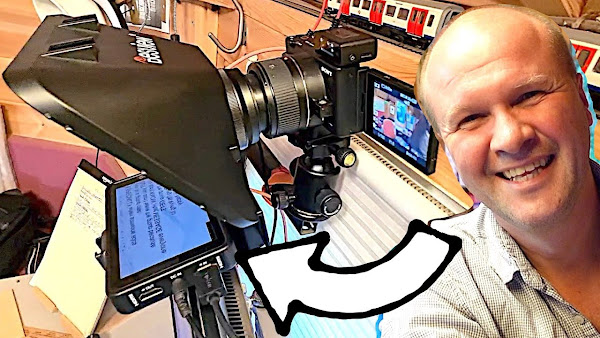
How to setup TELEPROMPTER for YouTube! My DESVIEW T3 prompter on Sony ZV-1 camera...


How do you use a prompter for YouTube videos? How do you set up a teleprompter on a Sony ZV-1 camera? Which is the best budget autocue on Amazon? I share how I set up my teleprompter in my YouTube home studio, using the DESVIEW T3 prompter on my Sony ZV1 camera. I also use a Desview R5 mkii 7 inch field monitor to put the words on screen with Google Docs from my PC.
Finally there's a full unboxing first impressions review of the Desview T3 autocue straight out of the box from Amazon!

Buy the DESVIEW T3 TELEPROMPTER here! (Commissions earned from Amazon) 👇👇👇👇
Buy DESVIEW R5 MKII 7 INCH FIELD MONITOR here! 👇👇👇👇

How to setup TELEPROMPTER for YouTube! My DESVIEW T3 prompter on Sony ZV-1 camera...


TRANSCRIPT: (CLICK PLAY ON THE VIDEO ABOVE)

THIS IS THE TRANSCRIPT - CLICK PLAY ON THE VIDEO ABOVE!

Hello, welcome back to the Happy Hut, welcome back to the channel. 
I'm Neil, and in this video, I'm going to be looking at teleprompters. 
Are they any good for your YouTube channel? Do they work? 
Which is the best one, and how do I fit a teleprompter to my Sony ZV1 camera? 
This video is basically an excuse for an unboxing of this: the Desview T3 teleprompter for tablet, smartphone, iPad, or in my case, the Sony ZV-1 camera. 
We'll get to the unboxing in a moment, but let me show you my setup because it's working really well for me.
This is the Desview T3 teleprompter. 
Down here is the Desview R5 Mark II field monitor. It's a 7-inch field monitor. 
Now, I'm not—I've paid for all of this with my own money, so this isn't sponsored and it hasn't been given to me for free—but I do really like this setup. Uh, let me show you how I've attached it to the camera. I'll go through this in detail on the unboxing, but I have a wide view lens adapter—can't even get the words out—attached to my Sony ZV1 camera, and on that, you have a ring where you can attach filters.
Well, that means I can attach a ring that holds the teleprompter to the camera.
Let me show you setting it up. 
You take the ring that comes with the teleprompter and screw that onto the filter ring. 
Then you can take off the protective cover for the teleprompter, and it reveals this kind of groove thing that you slip over the ring.
So the ring holds the teleprompter on the end of the camera for you, and this is what it looks like through the camera. So you don't get to see what is being projected onto the screen.
Look, I can show you, I've got words on my computer and they go onto the monitor, and they are reflected in the glass. 
Now, it looks like the monitor is far away on the camera, but in real life, the way that the optics work is that these words actually fill the screen, so I can see that on there. 
But my camera is not showing it because of the way it's—it's the laws of physics—means that I can't actually show you what my eyes can see, but I can see this text really clearly. 
The way I've done that is that I have, uh, a PC under my desk, and an HDMI lead comes out from the PC, and you just connect that to the field monitor. 
I've also got a power cable going in—it's usually a bit tidier than this—but I've got a power cable going in to power the monitor.
Now, the great thing with a field monitor is you can do this with a phone, but with a field monitor, I can bring up a menu on the monitor, and in the menu, I can set the monitor to reverse the text. So I can flip the image horizontally. So I don't know if I can get the camera close enough, but it's actually projecting backwards what is coming out from my PC.
The great thing with that is that I don't need any other apps.
I can just use Google, Google Plain old Google Docs!
So this is a Google Doc with my script on. I've got the zoom into 200%, and I've zoomed into that on my PC. 
And I can even hit F11 here, and that will fill the screen with the text. 
And then while I'm talking—so I hold the camera and talk at the same time—I can scroll the text. 
So I can say that “WhatsApp can be a complete pain sometimes, especially when someone adds you to a group chat”.
And I can just scroll through my script as I'm reading it.
I can do it at whatever speed I like. 
I can make this text bigger or smaller. I've got full flexibility. 
The other way that I use this setup is that I can put Zoom calls up onto the monitor, which means I can look at the camera.
I can give full eye contact to the screen throughout the call without having to awkwardly look up and down during the call. So this has been so helpful for me, and it's helped me to make so many more videos because it means that I can project the text or the image that I want to look at while I'm recording actually in my eyeline, and it's really helped.
It's not cheap, but I've been using this every day.
So this setup—I wish I'd gone for this setup earlier, but I tried bodging it with a phone and a cheaper teleprompter. I wanted to treat myself because I was using it so much.
This is how the Desview T3 teleprompter arrives. 
I'll just give you shots of all sides of the box.
It's a really nice, uh, bit of packaging, even though it's a plain brown box, actually makes it feel quite premium. So I'll open up the package, and we have a user guide.
I guess this is going to be all the adapters. 
Let's open this up.
Yeah, look, all the adapter rings and foam fillers for using it with a smartphone.
I’ll be using mine with a Sony ZV-1. 
Cleaner cloth, uh, there's more holders in there.
We have a teleprompter remote, and then the big thing in the box is the teleprompter itself.
This really nice foam packaging. But the main reason I wanted to buy this particular teleprompter is this. This is crucial. This ring here.
I don't have that on my other teleprompter, and other budget teleprompters do not have this.
This—between uses—if that's open—hang on, just trying to open it up to demonstrate—there's like a lip here on it. It says pull. That's really helpful. Not following that at all.
That just slides on. 
What happens is, if that's open, dust gets into it, inside it. So I'm constantly having to clean inside the teleprompter screen. So to cover it up for protection, this has a nice tray, nice branded cover that just slides on like that.
So we have the two cold shoe mounts. Again, I'm going to be using that. I'll put a ring light on one, and I can put my—you could put a monitor, or I could put my wireless mic receiver so I can see the levels on there. 
The other reason I wanted to buy this one is because of this nice big gap down here. 
I've got a nice chunky Desview field monitor that I use for—oh hello, you can see me—I use a field monitor, and the monitor is just too close to the glass on my other budget teleprompter. 
The different-sized foam cutouts for pressing against a smartphone if you're using the smartphone to record rather than the smartphone to do the cueing and the word projection. 
And we have all these different adapter rings, and they all come individually wrapped, which is a nice touch. Look up here, I have a pretend setup to find your ring. I'll open the 52 mm. 
Let's see if this one fits. Like a glove.
So the idea is for this to—sorry, this is to simulate your camera.
This smartphone holder isn't actually a smartphone holder.
You can pull it out this much for a phone, like—I'll demonstrate.
This is a Samsung S20, but you can stretch further by pressing this button here.
It gives you an extra extension, so this can hold up to, I think it says—you'll have to check this, but I think it's an 11-inch tablet. 
The instructions aren't very clear, but what we need to do is loosen this, which then drops this holder section like that. And that reveals an area where we can put the bolt in. 
So I'll slide the bolt through here, line it up with the bolt, and just screw this in. The holder is firm, and I can now push this back up. But what's great with the T3, the Desview T3, is that you can adjust the height.
We are good to go. 
So if I take off this protective holder—hang on, I could just slide it out. There we go. 
The way you mount it onto an SLR, DSLR, or mirrorless camera—or I do it with my ZV1 with the ring adapter—slide the teleprompter onto this ring, and that holds it in place like that. Let me show you what it looks like side on, and this looks really good. 
So what I want to do now, obviously, is put it on the camera that you're watching right now. So I'm now on my phone. I can do this one-handed. Hopefully, just slide it off the ring. There we go.
And I can now mount the teleprompter onto my ZV-1 so you can see the view from the camera.
But on the side, all I do is line up the teleprompter with this ring and just pull it on into place. 
I'm doing this one-handed, which isn't helpful, but here we go. 
Click, and on it goes. And oh, that looks so good.
So the greatest thing for me, for the Desview T3, is if I take this off—just slide it up like that—I do not want dust going into that hole. 
I can already see some is getting in there, so slide that in, click, and then I can put the protective ring on, and that will stop dust, pollen, and debris from going into the teleprompter while it's in storage. 
That unboxing was recorded about 3 weeks ago.
I've been using this setup every day, pretty much every time I put the camera on.
I've used it for Zoom calls for my day job, and I can just read the text straight off the camera, straight down the barrel of the lens, so you get the full effect of me speaking fluently as if I know what I'm talking about because I've planned it in advance and I've put the script on the screen. 
If you have any questions, leave a comment down below. Just say hi, it'd be lovely to hear from you.
And thank you for hitting the thumbs up or the subscribe button.
It really helps me to keep this channel going. 
I hope this video is useful, and right here is what YouTube knows you want to be watching next.


Previous post...
My best first CAMERA BAG on Amazon! Pgytech Onemo 25L Backpack unboxing and first impressions review


All about me, and getting these by email.
Friday, 2 February 2024

How to DELETE a NETFLIX PROFILE in under a minute!


How do you delete a Netflix Profile? I show you step-by-step how to remove and delete any Netflix profile using a laptop, PC, macbook or mac... as well as deleting a profile using the Netflix app on an Android phone, iPhone or iPad. It's really quick and easy to delete a Netflix profile, but please note we can't delete the main profile for the Netflix account.

How to DELETE a NETFLIX PROFILE in under a minute!


TRANSCRIPT: (CLICK PLAY ON THE VIDEO ABOVE)

THIS IS THE TRANSCRIPT - CLICK PLAY ON THE VIDEO ABOVE!

Hello, having Netflix is great, but I'm a dad, and all the I.T. in our house falls to me... even though I'm no good at it. And sometimes we need to kick someone off our Netflix account. 
The new thing I'm trying to make your family happy is to delete a Netflix profile. 
Don't worry; this is just a demonstration. Nothing bad has happened to Granddad; he's allowing me to delete his Netflix profile. 
And my name's not Frank; it's Neil. 
Hello, I just find it funny to put my dad hero Frank Spencer on all my videos. 
We'll do this on a phone on the Netflix app, but just in case you can't do this on your app: 
To delete a Netflix profile on a Windows PC, laptop, Mac, or MacBook, go into your internet browser, so that's Chrome, Safari, or Edge. 
Go to netflix.com and sign into your account. 
And this brings up our page for manage profiles. 
There's a button underneath the profiles. 
Click on manage profiles.
We'll do this on the Netflix phone app next, but here we can click on the pen icon on the profile you want to delete. 
By the way, you cannot delete the main profile of the account. 
So if we look at Frank's account, he doesn't have this option. 
But over in Granddad's profile, scroll down, and there's a button at the bottom marked “delete profile”. 
We can click on this and confirm to remove the Netflix profile. 
In the Netflix mobile app for Android, iPhone, or iPad, when you're logged in on the lower right-hand side, tap on "My Netflix." 
It doesn't matter which profile you're in. 
On the upper right-hand corner, you can see this menu; it has three lines, or it looks like a hamburger. 
Click on this and then click on manage profiles. 
That brings up all the profiles with icons of pens on to edit them. 
Choose the profile you want to delete, 
scroll down, and you can see the button "Delete profile." 
Don't forget; you can't delete the main profile for the Netflix account. 
So if I go into Frank's profile, there's no delete profile button.
If you can't do this on the app, just open the browser on your phone and sign into netflix.com. 
Congratulations, you have now deleted a profile on Netflix! 
I'm calling this a Dad Delivers success! 
Say hi in the comments; it would be lovely to hear from you. 
And thank you for hitting the thumbs up or the subscribe button; it really helps me out. 
And right here is what YouTube knows you will love watching next. 
After watching some Netflix. 
Can you please help my daddy get 10,000 subscribers? 
Just click on his face. Thanks, bye. Alright, this is going to be the proper one, right?


Previous post...
Girl's bedroom storage idea: IKEA Rashult Trolley!


All about me, and getting these by email.

Friday, 19 January 2024

Easy NETFLIX sign in to SMART TV... PLUS logout of your account!


How to sign SMART TV in to NETFLIX! Step-by-step I share how to connect Netflix to Smart TV from your phone, PLUS how to sign out and remove your Netflix account from your TV. If you're signed in on someone else's Netflix account, this video will walk you through how to login with your own account to add Netflix to your TV. All by using just your phone, the QR code, or regular Netflix account and password.

Easy NETFLIX sign in to SMART TV... PLUS logout of your account!


TRANSCRIPT: (CLICK PLAY ON THE VIDEO ABOVE)

THIS IS THE TRANSCRIPT - CLICK PLAY ON THE VIDEO ABOVE!

Hello, welcome back to the channel and welcome to our living room! 
I think this is the first time we've done a nighttime video like this because we are going to sign in Netflix. Oh, I’ve got cramp! 
We are going to sign Netflix into our smart TV, and I'm going to see how long I can sit in this position. Not long, I think. 
When I became a dad, I became IT manager for our family, and I'm no good at IT or being a manager, but I can make your family happy by connecting Netflix on a smart TV.
I'll show you how to do this with a phone using the QR code to scan on screen and without a phone just by typing in our Netflix login. 
I'll also show you how to log out from Netflix on a TV and how to remove a Netflix account from a smart TV. 
The first thing we need to do, obviously, is to go to Netflix on the TV. 
We've helpfully got a button to fire up the Netflix app on our Smart TV. 
Oh, by the way, I made this whole video on how to create a Netflix account from scratch step by step; that's on screen now, or there's a link to that video down in the description. 
If you have an account, the first thing we need to do is to click on this button here, “sign in”. So I'm going to use the arrow keys on my remote, and I'm going to click on “sign in”. 
The easiest way to sign in is to use this QR code. 
I feel like a really bad weatherman, but let me show you the longest, hardest way to do this first. 
We can use our remote to click on this tab here, “use remote”. 
So I'm going to click that, and then I'll click okay. 
This way we can use the remote control to type in our Netflix login. 
We'll just type in our username here, and you can click on the button down here, “forgot password”, if you want to reset your Netflix password for this email. 
By the way, it does remember the last email address you used on this, so if you've been using someone else's account, you might want to come down here to this box here and click on “remember email” and uncheck this box.
But happily, there is a way to do this without having to remember your password. 
If you have the Netflix app on your phone and if you're logged into Netflix on your phone, we are going to click on the left arrow, and we're going to move over here to “use phone”.
For “use phone”, it brings up this wonderful page where we have a QR code. 
We have some stormy showers over here in the southern region, and up here, there's a code that we can type in. 
Let me show you the QR code way first. 
All we need to do is open the camera on our phone. 
If your phone scans QR codes, for me the camera has to be set to photo, not video; that doesn't work, so we'll set it to photo. 
And then we'll point the camera at the screen until it locks onto that QR code and it brings up the URL, and I'll just tap on that. 
And that opens up my Netflix app and this message here: “To sign in please confirm the code below matches the TV”, and now I can just click on the “sign in to TV” button, and it says we're all set! 
“You can now enjoy Netflix” on my Smart TV, and we can see that it's... it’s triggered up the Netflix logo. 
This might take a while if the kids are all on the Netflix. 
Oh, here we go! 
Young Sheldon, fantastic. 
If your camera doesn't do this or you can't scan QR codes, you can type in the web address URL that's on your TV screen into your phone's internet browser.
And all we do now is to type in the code that's on our TV screen. 
So now your Smart TV is connected to your Netflix account. Congratulations! 
And there's no need to sign in because this is now on our Netflix login. 
Here is how to sign out your Smart TV from a Netflix account. 
We're going to go into one of the profiles, so I'll click on here. 
And then on the left-hand side of the screen, we have these icons. 
We don't need any of those. 
We're going to move the cursor down, whoa, down these icons here and bring it over to the right-hand side of the screen to highlight “get help”. I do need to get help; this is true. 
If we scroll down, we'll use the down arrow to go down all of these menu options, all the way down past “contact us”, “check your network” right down to the very bottom. You can see this option here, “sign out”. 
And now I can click okay on the remote, and it asks do we want to sign out, so I'll click “yes”, and that unlinks your smart TV. 
It logs out from your Netflix account.
I am calling this a dad delivers success, a living room success! 
Say hi in the comments; it would be lovely to hear from you. 
And thank you for hitting the thumbs up or the Subscribe button; it really does help me to keep this channel going. So thank you. 
And right here is what YouTube knows you want to watch next after you've been watching the Netflix on your smart TV! I want to do the weather...


Previous post...
How to make a free Google Account on a computer, PC, Apple Mac, macbook or windows laptop


All about me, and getting these by email.
Monday, 4 September 2023

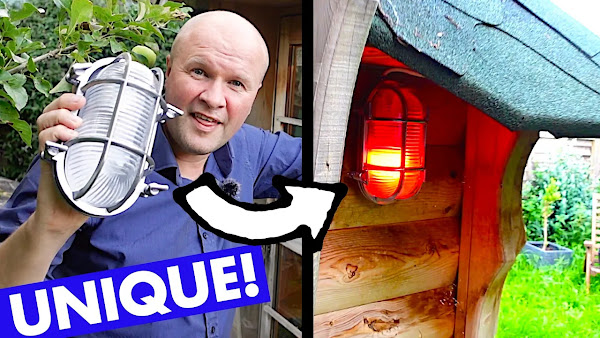
How to make a red on air light for recording studio


Putting up a stylish red retro industrial On Air recording light outside my YouTube studio together with an illuminated on off switch! I walk you through the process of choosing the vintage bulkhead light, and then fitting it to the Happy Hut... connecting it to a 22mm illuminated 240v mains latching switch to turn the on air light off and on again. I also try to explain why I'm obsessed with studio recording and transmission lights, like the ones at BBC Television Centre in its heyday.

Retro Bulkhead light BUY ONE HERE!
As an Amazon Associate I earn from qualifying purchases.
Illuminated latching on off switch!

My YouTube studio transformed by THIS!


TRANSCRIPT: (CLICK PLAY ON THE VIDEO ABOVE)

THIS IS THE TRANSCRIPT - CLICK PLAY ON THE VIDEO ABOVE!

Hello, I'm Neil. Welcome back to the channel, and welcome back to the Happy Hut because this is a really, really big day for the Happy Hut. This is how it looks right now, and this is how it looks in the future. I obviously can't see this; I've edited this in. I am putting up a stylish red recording on-air light outside the door of the Happy Hut. We can see this right from the other end of the garden, and it can go on when I'm recording or going live. Then when I'm done, I can remotely switch it off, which means this lovely on-off switch which controls the on-air light and it lights up when the light is actually on outside. That footage is from future me; this is how it looks right now.
I really do not know where to start. I don't know if you can see the spider's web in there. Now, I want a light to go here, partly to look cool, but mostly it's for the rest of the family. They don't know whether they can come in or not while I'm working in here, so they just kind of hover out here. It's annoying for them, but I absolutely love TV and radio Studio on-air lights. This is from my student Radio Days. Look at the state of that. I don't want it to look like that; 
[ME IN 1994] “It's a mixture of news and specialist speech...” 
And I don't want it to look like that!
I have seen some really good professional signs, but the mother of all on-air lights was, of course, the ones at BBC Television Centre. They are absolutely beautiful. Look at them. I love how it doesn't say "on air" or "recording"; they have really big words on there: I love those whole words... rehearsal, transmission, audience entrance. 
I don't want words on mine; the on-air or recording signs you can buy online are absolutely abysmal, ugly, cheap-looking, badly made. They just don't look real at all. Instead, I'm buying this; it's a bulkhead light. I'm kind of going for the look of an industrial workplace. So even though my love is for TV and radio, I think this is more of a movie studio warning light look. I'm putting a link in the description to this type of light; it's called a bulkhead light, and you can see that the way that you get into it, it's completely waterproof and weatherproof, and it has these bolts on the sides. If you unscrew these bolts, you can open up the glass and the protective cage, and there's a really standard light fitting in there.
The biggest question for me right now is where exactly to put this. I'm going to have... there are bolts for the cable to come out the top, and that's completely weatherproofed, I don't know what you call it, a grommet, it's like a rubber thing in there. I think I really want it this way up, but I don't know whether to put it here; you can kind of see it better, and the roof doesn't block the view of it, but it looks much tidier higher up, kind of tucked under the roof. It means that the cabling will be a lot tidier; I won't have a big cable running down the middle of the wall here. You can still see the light from the end of the garden, and the whole thing just looks a lot tidier.
The cabling is going to run underneath this; it's like a gap between here, it's like a false panel. I don't know if this is going to be a permanent solution, but the cabling, I've got an idea for the wire to use for it, just to get it up and running.
Hey Joe, can I ask a favour? 
This is like an extension lead here? Thanks. 
I'm going to take it apart and permanently destroy it. I am going to use this 5-metre extension cable; I'm going to completely take it apart and use the plug and the long lead to run through the Hut and out to the outside to the bulkhead light. I've looked at buying some cable from Amazon, and it's almost cheaper to use the extension lead and cut off the plugs from the end.
I just trod on a wasp, and oh man, I had bare feet. But it's never easy, is it? 
Here's the time-lapse now of me putting the bulkhead light up into position and screwing it into place. And then I'll have to figure out how I deal with the cabling. I think before I can put it up, I now need to sort out the wiring. So, let's take down this, and we'll get some cabling behind it. This turns out to be a lot harder than I think it is. I don't know why - the screws haven't been moved in five years since the Hut was built.
I'm now using my drill as a screwdriver, plus, and I'm in a bit of a heightened state because of the wasp-sting. But what is that down there? Some kind of bug pupa thing. I have had some wasps hibernating in the Hut, and I see them in June trying to get out the window. I wonder if this one was left behind or whether that was the, uh, the thing that it grew in. 
It's the next day, and my foot is better, thank you for asking, but still swollen, still hurts from the wasp sting. I'm gonna power through it and take my mind off. I've never drilled an actual hole through the skin, through the walls of the Hut. I'm a bit anxious about this, but there's, there's no way around it. I've just got to take my best guess and hope that it's not going to go wrong. I'm removing this wooden panel first to make it easier to drill into the wood, and I'm drilling into the exact place I want the power cable to go, trying to make it dead centre of the panel so that it will hide the wires.
Well, it's gone through something, but what has it gone through? Let's have a look out here, please, please, please. I don't really want the wire showing on this side. Okay, it's through again. It's going to be Swiss cheese by the time I finish with it. Let's go outside. oh saved by the Bell. Ah, great. So the hole is just too far to the right. Okay, the problem I've got is that this is the furthest right I can have the cable because of the panel, but it's too far to the left. So if I do another hole and try and put it in a funny, wonky angle, maybe that will work. Third time lucky, but where did it end up? Let's have a look, come outside.
Perfect. Oh, it's kind of overshot a bit too much. I could have gone that way, but that's good. Ow, that looks perfect. Okay. Well, it's designed to last, so these are nice long pieces of lead. Cut them off; that'll save me having to strip them. Now the cable is through. I can, it's kind of in the right place. I prefer it a bit further on the right, but I'm just happy to have some power cable out here. All I need to do now is wire it up into the bulkhead light fitting.
This takes me a bit longer than I planned. It's a bit fiddly, so I'm taking a nice sit down and just enjoying the process. I'm not enjoying the process. We are powered up, cabled up, good to go, I think. So I just need to feed the cable back into the hut so that it'll be nice and flush.
Now it's time for the moment of truth. Let's go into the hut. I'm going to put the bulb into the bayonet and just screw that in nice and tightly. But I don't know if this is going to work, so let's plug the other end in. Oh, please work, please work, please work. Whoa, yes, stage one complete. And I'm hoping I can see this from the path down the garden. Yeah, you can definitely see that. Okay, this is good. This is good. So we go to the next stage, which is to sort a nice switch out. This is a 240-volt Mains AC on-off switch that I'm hoping will light up. So you push it in and out; it's like a toggle switch, latching switch.
But to tidy this up, I know that it works now, so I can tidy up the wooden panel, and for that, I think I just need to do the reverse of what I did before. So I might give it a little Hoover, little vacuum, and then straighten the cord and try to get the screws back into the original holes. It was a bit of a bish-bash-bosh job. I can hide everything with pulling that shelf back on. By the way, this is what it takes to wire one of these switches. It's... the state of the place! It's been so difficult to wire up just this tiny switch.
Now it's the really tricky bit, the bit that could damage the whole Hut. I need to drill a hole in this so that the switch can sit through. So there's no going back; once I drill this hole, it's so huge, the button's just got to go in anyway. I'm laying the sheets down so that I can protect the board of wood, and it's nearly sunset. I really want to get this done before it gets dark, but I'm using this spade drill bit. It's the exact width or diameter of the switch, and it's just started raining. I've got to be really quick.
All right, I think that is pretty perfect.
It's exactly what I wanted. Let’s get back to the hut before it gets dark and rains harder. Ah, look at that, fits almost exactly. So, I didn't check the width of the wood, um, it's too thick for the washer thing to go on. Oh, this is so tricky. I could just butcher the wood to just cut some more out, and then this is what holds it in place. I could fill it with hot glue from a hot glue gun.
It's the next day, it's a lot sunnier in the garden, and out comes the inevitable white cloth to protect the board yet again as I deface it, start pulling it apart again. The poor thing, what is it going through? This is me chiseling at the back. I've marked out an area that I hope, the kind of wing nut, not wing nut, what you call it, it's just a nut that goes on the back and screws in to hold the button in place. I've kind of guessed how much space I'll need to turn it round, and I've kind of guessed the depth as well, but I've got halfway and we'll see how much more I'll need to chisel off.
This is now how we're looking. Let's see how far we've gone. Here is the button causing all the problems. Let's push it through. Oh, actually, that's looking quite proud. So if I can just, all I need is one ring of thread to be able to, no, I've got to go further. My biggest worry now is if I use a bigger hammer, is I do not want to smash the front of this single original piece of wood. I do not want to crack or go through this. So, probably another few millimetres down. I'm kind of sick of the chiselling by now. I'm not very good at chiseling. I don't have a good technique and I could definitely do with a sharper chisel as well.
But let's just keep going with this and see if I can bring it down to the right depth. Okay, now this is looking a lot more promising. Can I get this washer on, or nut or whatever you call it? And look, it's perfect. Okay, we're good. We've done it, and I think I'm going to move the screw that was there. It would just look ugly and confusing so close to the light switch. So I'm filling up the hole with some wood filler and hoping that I can sand it down and it will just blend in. But I think even with the filler there, it will just look better and flatter than with having the screw hanging out.
Now I'm doing something that I've not done before, and that's some basic cable management behind the panel to move the big cable to the side so that the switch has lots of space behind it. And then I'm going to pin the cable for the switch in the right position. By the way, this is how the loom works. This is my wiring. I wouldn't copy my wiring. I would follow the diagram on the Amazon page.
Now the very special moment where I can attach the loom onto the back of the switch. Make sure it clicks and the switch is holding, and then I can screw this panel back to the wall. Everything is tidy. I think we might be ready to go. It's time now for the moment of truth. Let me turn some lights off. Let me turn this light off. Pan the camera over to the switch. Here we go.
[Music]
[Music]
It works! 
It works! I did it! I love it! I absolutely love it! 
I've only got one more thing to change.


Previous post...
Taking an easy free online hearing test


All about me, and getting these by email.
Sunday, 4 September 2022

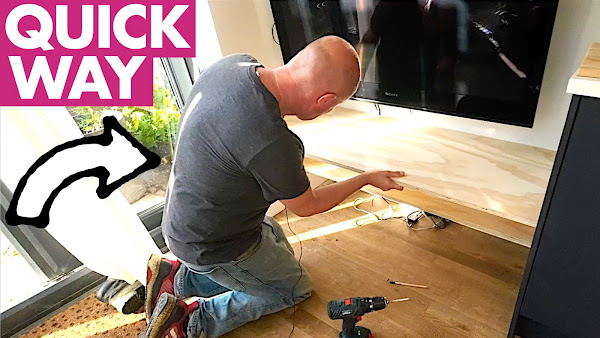
How to build TV shelf unit


Ever wanted to build your own TV shelving unit to store your TV, video boxes, consoles and DVDs?
I share building my own floating shelves wooden TV unit with some plywood from the B&Q DIY superstore, and a pair of IKEA Granhult shelf holders.

How I'm building a TV shelf unit... plus IKEA Granhult brackets!


TRANSCRIPT: (CLICK PLAY ON THE VIDEO ABOVE)

THIS IS THE TRANSCRIPT - CLICK PLAY ON THE VIDEO ABOVE!

Hello I'm Neil we're going to be doing something not out here but in here in the corner of the kitchen where the TV is.
This is the channel where we try something... “we”... 
I try something new every day to make the family happy and today I'm going to make the family happy with this! 
I'm gonna try and get a TV shelf going in the corner of the kitchen slash living room slash the room where we do everything.
This is a tricky one because I've got something temporary going... this shelf is completely fake.
It’s not even wide enough - it's just a bit of rough wood that the builders left. 
I think they mixed cement on it but it was all I could put up here but the main tv shelf is down here to hold all the boxes.
We still have DVDs. 
Is that because we're old parents? Probably but we've also got consoles and a Freeview box which is behind that bench, so at the moment we’ve just got temporary stuff here just to soften it. 
It looks better than it being completely bare, so how do you make a tv shelf though or a shelving unit? 
Or just shelves to put around a big TV? 
This has been a tricky one for us because we... I don't think we're even convinced that this is the right place for the tv but it's been about six months now and this is where it is. 
We've got a sofa. This is pretty much the only place to have the sofa.
There is such a big distance from sitting here, to the tv being over there. 
It's about four metres and I try to get around that by rigging up a cable, if you see this audio cable, so at least we've got a speaker where we sit so we can actually hear the tv all the way over there! And it is a long way away. I think this camera is going to make it look a lot closer. But this is the view at the moment which isn't too bad. 
I've got an IKEA bench down there. There's a whole video on how I built that bench on this channel. 
It’s an IKEA Perjohan bench and it's great but it is designed for sitting on, it's not designed for putting boxes. 
I've taken the boxes off to try and measure up and get the right wood for this area. 
It's a big piece of wood that I need! 
So... 
Okay I've got the wood, time to get it cut now just over here. 
When I was building the L-shaped bench sides, which again is another video on the channel. 
I got the wood cut into strips for our bench in the corner of the kitchen over there.
That’s worked out really well but it was a huge piece of wood. 
I went to a DIY superstore B&Q in this case, I usually flip between that and Wickes. 
It's one of these! 
...And went on the hunt for the perfect piece of wood and obviously the bigger the wood, the more expensive it is. So I went for this, it's plywood. 
I always like the look of plywood: I like these strips down the side of the wood but it was a pretty huge sheet of wood that I needed to get.
I knew that if I cut the strips for the the bench over there I'd have a big piece left and the big piece is going to be the centrepiece. It's going to going to be the big shelf that's going to hide everything hopefully.
I even had enough left over for two other shelves underneath but this is footage of me trying to get it desperately off the shelf. 
And also film it so I could share my technique with you.
My technique being that if I whip it off like when you pull a tablecloth off a table and leave everything standing on the table... I tried that with this giant piece of plywood.
It didn't quite work. The first I think five times... but here I am just giving it one more yank one... oh no it's just it's just twisting around. 
And also they left a big trolley in front of it to just to make it that little bit difficult but it just makes the wood even more special, and with one final tug I managed to to get it out.
Next challenge of course is to get it onto a trolley and over to the cutting area. 
I'm sure I would have got help if I'd asked for it but I'm a man and you know asking for help is weakness. Especially in the DIY realm. The cutting service were absolutely brilliant. I had... I've got this. This is my map. You've probably seen this on the bench video but I managed to work out how to divide a 1.2m by 2.4m giant piece of plywood into what I needed for the old bench and for the TV area and the... the guy he must be so used to scraps of paper with bad biro on... and a mixture of metres and centimetres and millimetres.
So got it cut: it looks perfect look at it! Just what I wanted.
Go to the checkout now.
I saw some reviews about this particular piece of wood saying it's really bad and it falls apart but here’s me unloading it from the car.
Managed to get it back in one piece or in my case about 12 pieces and this is the wood right here! 
I think it looks amazing.
It is a cheap bit of wood uh in the scheme of things well I... you know, paid 50 quid for... for the giant sheet so it's not... it's not that cheap, but this is going to be the main shelf. The big challenge I've got now is that I was a bit too precise in my measurements so I've scored a little bit off the edge here. 
I'm going to cut the edge right now. 
First thing is to protect the wood from my grotty IKEA Seglaro table.
We’ve got all sorts on here so I'm just laying out a blanket so it's got a nice cushioned underlay and I've marked out a straight line. 
The line is straight but it's not square but I've taken a best guess at a proper square from the front and rear edge here and I'm going to take off about half a centimetre. 
I’m going to use a mitre saw and just use that to cut the straight line that I've marked out along the end of this bit of plywood.
This is how it will look, obviously without the bench. 
There's two things... I wanted the... the nice store-bought side on this side, instead of my rough sawing, but I can sand that down. 
The biggest challenge now is to build some kind of ledge for it.
I don't want to wreck these kitchen cabinets because they cost a fortune, and who knows how we might want to change it long into the future. 
I don't want like screw holes in here, this is going to be nearly impossible to change. 
So I'm going to build um I'm going to build like a ledge that will go up made of this wood. 
The shelf will just sit on top of that leg. 
How high would you make your TV bench?
Leave a... leave a comment down below. I'm kind of happy with this height of shelf and I've left almost the same amount of space underneath so there's some kind of symmetry to it. 
I don't want it to feel too boxed in. 
Also one day, maybe one day we'll get a bigger TV. 
The whole family are on at me to do that but I've got a bit more space just to make that TV uh even more huge than it already is. 
Uh the next tricky bit is to whip out this bench. 
Whoa! Of course I'll leave all the electronics loose underneath while I do this!
The shelf is 50 centimetres deep so I'm cutting this batten down to 40 centimetres so that it won't be sticking out at the edge. 
Hopefully if I do this right it could even look like it's floating and to do that I'm going to take off this diagonal edge from the end so that the the block holding up the shelf sort of looks uh invisible from the front. 
Look I know it's 2022 and it's not a thing anymore but I just want to see if I can get a dvd under it. 
These were my shelves before my last shelves see I don't like the big brace here but that was heavy enough to carry a really heavy tv before this one. 
So this one is just a little bit bigger than the Transformers Dark of the Moon DVD. 
I'll take it back to my new shelf and this is where the the bracket is going to be. 
So I'll just drill these pilot holes here, using a really thin drill bit and keeping an eye on the spirit level to make sure this bracket stays straight. 
I'll put a big drill bit in.
So now we'll get the screws in and get this bracket onto the wall 
I'm going to screw one side in lightly first and then get the other screw in just to make sure it's all lined up 
Let's check that it's level - no - yes it's just a really slow bubble, so one side done level and strong. 
Let’s cut this bracket to size 
obviously it's a lot shorter than the last one and I'll get the countersink drill bit out again just to knock in a couple of holes. So just lift the shelf up to where I want it to be without bending the wires too much. That is about as high as it goes: any higher it's going to really be difficult to put plugs in.
So, I need a bit of wood to go on the right hand side here. 
Oh will it be the correct height though? It won't stand up by itself - it's so not straight. 
Yes success!
That's the first one done. 
The next part of my scheme is over here. 
I’m gonna put another leg up here to bring it up to the correct height for this bracket here. Is my measuring up to the task? 
Now I can take this - whoa - into here... nearly hit the roof there... and then I could put it under here just to have it balance on that.
Just check with the spirit level...
Spot on! Yes that works! See I didn't think it'd be this far forward 
This is 50 centimetres deep 
I wonder if it should be 40 but we can leave it like this for now and I can always take 10 centimetres off the back if it's too proud. 
Now I've got a special drill bit - I think it's my favourite drill bit where you can actually drill holes - large big holes into the back of the shelves. 
This is so that I can run cables down and run the shelf flush all the way to the back of the wall and the cables and wires can all go down this little hole at the back here, so I'll just put one into the big shelf the top and then I can do the same for the little shelf. 
And if I wanted to run cables all the way to the bottom I can and they can run through the shelves.
The final thing I need to do for the TV corner is to put a better shelf up above the TV. 
And the plan was to have two shelves up above but um I only bought one IKEA Granhult shelf bracket pair. That’s what they look like. 
I wanted to try one pair just to see if it works and it really does so now that this shelf is up I've got to figure out a way to get some more wood that is identical without buying a massive two metre sheet of it, and then cutting it to size just for that second shelf above that shelf. So we've got two shelves at the top and two shelves at the bottom... I think this is done! 
Let's let's dress it and give you some beauty shots just to show you what it what it really should be looking like.
I am calling this a dad delivers - thonk - success! 
It's done! 
It's finally done thanks for being awesome and hitting the thumbs up button to help others find this video and subscribing to more adventures for you and me around the house to make our families happy. Can you please help my daddy get 10000 subscribers? Just click on his face thanks bye! Alright this is going to be the proper one right?

Previous post...
Jean Claude Van Damme interview with Richard Blackwood 2001


All about me, and getting these by email.
Monday, 22 August 2022

Jean Claude Van Damme interview with Richard Blackwood 2001


NEW: Watch the raw rushes from this TV shoot here: https://youtu.be/yjZEddc8g9g
LOADS OF JEAN-CLAUDE VAN DAMME STUFF HERE
As an Amazon Associate I earn from qualifying purchases, thanks
https://amzn.to/2YlFW21


Action Movie legend Jean-Claude Van Damme meets British actor comedian Richard Blackwood in a comedy interview show I produced in 2001.  A difficult show for me, for many reasons - you can see younger me at a couple of points (this was a few days before the terrible events of September).

0:00 Jean-Claude Van Damme long interview
0:30 Where does Jean-Claude Van Damme live? Who is Jean Claude Van Damme's wife? What car does Jean-Claude Van Damme drive? 
6:20 Tour of Jean-Claude Van Damme's clothing factory, Dammage 7. How tall is Jean Claude Van Damme in feet? What is Jean Claude Van Damme's shoe size? How are stonewashed denim jeans made?
8:15 When did Jean Claude Van Damme come to Hollywood? Jean-Claude Van Damme performs a martial arts swing kick.
11:15 Going to a Beverly Hills restaurant with Jean-Claude Van Damme. Jean Claude Van Damme bathroom handwashing technique. Where Jean Claude Van Damme from? Is Jean Claude Van Damme left handed? Is Jean Claude Van Damme an artist?Jean-Claude Van Damme's style of martial arts.
15:32 Why does Jean Claude Van Damme have a bump on his head?

From it, 16 years on, I've learnt that however hard a day's shoot is... it's only one day.  Plus that his real name is Jean-Claude Camille François Van Varenberg.  He was a very nice guy.

TRANSCRIPT: (CLICK PLAY ON THE VIDEO ABOVE)

THIS IS THE TRANSCRIPT - CLICK PLAY ON THE VIDEO ABOVE!

Hey Jorge...
Shhaa! Like they’re for sparring.
[fighting noises]
He’s good, he’s good!
You know it's like one, two... Yeah!
You know like yes!
Okay so you’re like a bad guy, right?
Right there.
So I go here...
This is Jean Claude, watch this!
[SHOUTS]
JeezChrist! Saw that?
Hey come on, this is a real guy huh?
Oh OH OH and of course, DAMMAGE 7!
Ahh! There you go!
Be careful of your lens!
[Music]
Does he have any dogs by the way?
No Dogs! No Dogs! No.
Black men and dogs don't go.
That's like that's like chicken and cheese,
that sh-- don't go together.
(No pitbull! No doberman pincher!)
Look at this, look at this.
You might wanna knock there.
Jean-Claude?
Is there cameras? Does he have cameras?
Oh yeah he has a security camera.
Hey, hey!
What is that big four legged thing I see?
That's a dog, bro!
Well I mean it’s not a vicious dog! It's a... you know...
It's Jean-Claude's dog! It must be vicious bro, the guy knows Kung Fu for like 15 years!
Uh oh, somebody's at the window.
They called security.
Where we're looking?
Hello?
I don't think he's coming back downstairs.
Tell you what, you knock the door, alright that way if he comes out to kick somebody
in the chin it's you.
I ain't gettin involved
Ringing the bell's good!
I said yeah I think Jean-Claude said “hold on”--
OOP [Laughs]
Oh wait a minute!
I have to take a shower - 20 minutes.
Go ahead - do your thing.
It won't take - sorry guys I'm late.
Do it, brother, handle your business.
Thank you very much sorry guy.
Sorry, sorry, sorry...
Handle. Alright.
Okay.
In a mo - we're right here!
See you!
Take care.
Alright. This is Jean-Claude's car people.
Film this. ONE of his cars. How many cars does he have?
Well, for the record - a few.
A few. We like that.
I like this is the beach house car.
Imagine you can have a car specific to where it is that you live.
I live by the beach - I have a beach car.
This is my beach car right here!
That's my wife Gladys.
Don't! I look terrible.
You look great.
We met twice, we shook hands twice.
Here you go a third time, it's a cup of coffee.
Okay some water and then we go.
Now are we going to take our car or the limo?
(chatter)
It's cool guy. Right there, talking away, it's cool guy.
(chatter in French)
I changed my schedule.
We have meetings all day today. Book, book, book, book.
Can I go with my car. We'll do an interview at the factory...
Yeah.
There, and then because I've got to go from downtown LA to meetings all day, all day, all day, by the time I come back with the limo...
Yeah...
I will be missing all my meetings. We'll do the interview in the factory.
In the factory...
This is cool with the machines of [machine noises]
I'm down with the [machine noises]
We’ll have to yell or when we scream.
Are you going to shoot right now?
No, we can walk and talk.
Because we wouldn't mind seeing the Jean-Claude home!
You want to see my home?
I would love to see your home.
You like that baby?
It's a mess now.
It's a mess?
Okay.
We have a new lady... and she's trying to get organised.
Okay that's alright, we don't want to go in your house and first time we go in your house it's messy!
But also they're waiting for me with the machine, in the factory - we have to because - there-
You know next time we'll have special things!
Oh alright, we tried to get in the home, but that's alright we can go to the garage instead that's cool.
Alright, he's gonna get the keys for the car.
I was trying to get in the house you know.
Houses. We're gonna rush the house!
It's not in the briefcase?
(chatter)
Just one second - very fast... Only the 2 of you.
Only 3 you'll see the house.
Don't go in the bedroom!
No we won't go in the bedroom.
We'll do that another time.
We'll do a special occasion.
I promise.
I'm sorry.
We ain't gonna try break up a happy home.
How did he turn around his bigass car?!
Which channel is this?
This is Sky.
Sky? Sorry sorry I'm sorry.
It's Sky channel.
Say hello to Sky channel.
Hello Sky channel!
He's all over the programme, we've interviewed him.
Baby I love you!
He's going to kiss his lady.
Look at that - a lot of love there. A lot of love.
So you've got meetings are we talking about some new movies from Jean-Claude Van Damme?
What's happening?
New movies new movies - a lot of shh man
I stopped training for 6 months
6 months is that a long time?
Yeah I travel all around the world trying to put up some stuff together
mmm-hmm
and it worked well...
okay
and I would get two movies in the can.
What are they called, so we know.
Replicant, and then The Order.
So you shot them back to back?
I'm starring in 2 new movies soon.
Reconstruction.
Yes I've noticed this.
It was awarded in 1992 for the best construction.
It resists the earthquake and everything.
Now this is a badass car, so what can I sit up in the front is that what you're saying?
You come with me.
Alright!
Just let people know I'm getting in Jean-Claude's car, so just back up this is exclusive stuff right here.
See you guys don't be late! Wait for you!
[MUSIC]
Did he say ‘follow me’? I’ll drive slow?
[MUSIC]
What speed are we doing Steve? 80.
What’s the limit? 65. 
Back from Jean-Claude's car. Don't want you scratching it. 
Just get back there please, thank you.
Was Richard okay in the car?
Yeah, he he's putting his hand on my leg...
Now I don't know why he's trying to take it there, 'cos you know...
I was not safe with him!
[laughs]
I don't know what happened to Richard, but now I know the real Richard!
That was cool guy.
Yeah it's cool.
You want a jean?
You want a jean?
They all look like they're finished.
Is this all your line here?
No, we have Lucky Brand... We've got Guess... We’ve got Gap...
Oh okay.
Oh OH OH and of course, DAMMAGE 7!
Ahh! There you go!
Be careful of your lens!
I came very close.
Yeah that was actually quite good.
Oh oh oh oh!
Your kicks are very good! Your kicks are very good!
Can we have one?
I knew a girl with some legs like this once.
Alright these are some big jeans right here.
There's some big jeans.
The big fat guy.
Yeah there's some overweight lovers in the house.
Do you know what, you're actually taller than I thought you'd be.
Excuse me?
You're taller than I thought you would be.
Oh yeah.
A lot of people said you were short, but you're quite tall!
What are you about 5'8"?
Five, 5'9".
5'9"? Yeah you're very tall!
I'll have your shoes man.
Yeah, well I got these for free.
At Dada’s, Dada.
But I like yours those are Pradas, right?
Yeah yeah yeah, I've got small feet.
Yeah well I'm a size 10, what are you? Size 8?
9.
Okay that's not bad.
I've got them in white.
Oh oh oh oh!
Move forward a bit!
That's not, is that the back of your feet?
Ey! Hey! Hey! Amigo!
You know what they say about people with big feet!
You know what they say.
Big feet, big hands.
Big hands, big wallet, okay.
It's kind of cool because people are gonna see what they call a movie star like a normal guy right?
Yeah that's what they want.
You too, you're a normal guy. And we're here in a factory with very normal people and you can see how they make jeans because the movie--
And all the--
See the other side to Jean-Claude. The other side.
yeah hey whaaa-
Hey Jorge, momento...
Shhaa!
Like they’re for sparring.
[fighting noises]
He's good, he's good he's got the moves!
I reckon I could take him. But I ain't gonna try! Know what I mean?
This is my, by the way that's Arri, Arri Arrous, who is my jean designer.
Oh okay.
The head of my company. Dammage 7. 
He's been in the jean business for the last 22 years.
He's sacrificed all his life for jeans. But now finally he's going to work for his own brand called Dammage 7.
Every time you come here...
- Yeah
...it reminds me when I start in Los Angeles
yeah you were telling me in the car, now tell the people how you- how it was back then.
When I came in LA I came with a dream of becoming a movie star right?
Yeah.
So I came here with nothing! With that passion of wanting to make it.
Yeah.
Now I get the same passion with the jeans, but before that I came here, I drove a taxi, a limousine -
You serious?
I was sleeping in cars, I was sleeping in garage. 
Sometimes I stole my food.
I was having no money to buy the food you know?
So it was real rags to riches?
It was tough and rough!
Yeah.
And now I lost that you know when you drive the Bentley and a nice house and my kids they... they want a toy I can buy it.
Yes.
So I like to come back in this type of area.
Keeps you real.
Keeps me real, and the jean, that jean we are making it's also part of that process.
Oh wait, what's this now? What've we got here?
What have we got here?
Called the culture. Jean culture. Why culture?
That jean will have, that jean will have a pamphlet: 
"How to walk, and how to kick with it."
[Laughs]
You've got to show me that! You've got to show me that.
Low waist. 
Okay!
High here. One pocket.
Yeah.
No, sorry no bllshh...
Yeah. No bllshh
It will have the Dammage 7 line.
Yeah.
On the back. Very simple, with a side belt.
You know it's like one, two... Yeah!
You know like yes!
Your kicks are dangerous!
If you like a different colour, we'll have like 3 of them.
We'll have the culture. The teacher. And the key. K-E-Y, mono - mono.
Wow.
Not-homo.
No, no wait! Because we know Jean-Claude ain't nohomo.
We're French! I go to France...
Tell them the story.
I just land from... from America, and they say are you a humble social - you know French people, they're so obnoxious. They say the English people are---
I don't think so.
No not at all.
I'm very happy to be with Sky Channel.
Imagine like a guy... like a spy's here.
And the guy's here, like a bad guy right?
Right there.
So I go here.
This is Jean-Claude, watch this.
[Martial Arts noises]
Hey come on, this is a real guy huh?
No Bllshh-- like er...
Noone starts trouble with Jean-Claude Van Damme do they?
They can't start trouble...
It's for real stuff.
Because people say "Is he for real? Is he not for real?"
Yeah.
Of course I'm for real.
Yeah, yeah you can see that.
That's like a wide shot, no close ups, no cuts. You know?
You want to do lunch together?
Let's do lunch!
Okay we'll have lunch together. And we'll talk about life.
Yes we will, so are you going to go now
Er, Richard...
Blackwood.
No I know that but the... I slept with Richard Show.
I slept with Richard Blackwood but you didn't.
But...
I'm kidding, I didn't. But woman want to see that, we're not going to show that because it's not true!
It's not true.
That's right.
But that lady that you hugged...
Which one?
Where did she go?
This is... oh look over there and... CUT!
[LAUGHS]
[MUSIC]
[MUSIC]
Right now, the UK camera right here...
It's my show, right, right.
Nice guy.
This is what happens in LA, you're just walking down the street... bump into huge stars.
And they say hey, hi. How are ya?
[MUSIC]
[MUSIC]
I don't know my way - when I was a taxi driver in Los Angeles I didn't know my way.
So I drove those guys left and right.
He made the most money, getting lost! Right?
$13 was $26!
Cos he took the long route. But he drove us all around, and he had a navigational in the car. Just to let you know, in the spaceship. That's all I'm saying. Right, just let you know.
You believe in God? I believe in God.
Cool.
Do you believe in God?
I'm here.
Okay I hear that.
What do you want to drink? Coke?
Can I have erm- Coke is not good for the stomach bro!
That's right, I’m from Belgium man.
It's not good we've got to think ahead.
Sprite.

[wind noise] Like a horse. I'm built like a horse.
Sprite is good.
By the way I want to make a correction for "smaller hands and small feet".
I know this thing is a legend where - well the coke is good for the cows and horse.
[Laughs]
Do you think they're gonna cut that stuff out?
They'll keep it in.
No.
They'll keep it in - they're gonna keep all that stuff. They love that stuff.
Oh gosh.
I'm gonna wash my hands.
Yeah, yeah go ahead.
Wash my hands.
Go wash your hands bro, cos, I know what you've been doing.
[laughs] Handle your business. I won't tell nobody but wash your hands.
Come with me.
Are you sure?
Follow us in the toilet.
Follow us in the bathroom, so he cannot take advantage of me. [laughs]
You see how he asked ME to go to the bathroom though.
Oh sorry.
What's up!
Well I'm in here, I'll see you guys in a minute.
Gonna handle my business.
Might have to put the lock on the door.
My secret? Always wash your hands. Also for all the kids on the TV.
Film Jean Claude washing his hands!
Look you always wash your hands BEFORE going to the toilet.
Why is that?
Because, you know your weewee's clean no matter what. So you shake hands and people are sweating from their hands, so you have to wash - wash your hands before AND after.
Ahhh ha!
Yes.
Now I have to be honest, I didn't know that.
No, it's common sense buddy.
[LAUGH]
It's not that common, bro.
It's common sense! Buddy.
I'll wait for you.
Wait for me bro.
Okay, soap. Very good soap. Wash hands.
Paper, sir?
Paper sir? Like in Hong Kong. Been to Hong Kong?
Never.
You go to a bathroom in Hong Kong, you wash your hand, the guys there are [noises]
And this. 
[noises]
What was Jean-Claude the kid like? When he was growing up?
Skinny.
Serious?
Very skinny.
I was very, very skinny.
Yeah?
I was very skinny, I was not very gifted.
Yeah?
From nature, no.
So he wasn't - was he a sporty kid or was he... what was he?
In sports all the time.
Yeah?
Yeah because I was having a few... not handicap.
I was a lefty, they made me a right hand - they forced me to be a right hand which is bad I mean, not good I'm saying.
Yes.
It was not necessary for me to... to be changed to a right hand because I like freedom a lot and I was always a freedom child.
Yeah.
I was drawing a lot.
Are you a good artist?
Yeah.
Me too I like drawing.
Oh yeah?
Yeah I like drawing real life though - you know people do abstract art. I do real life.
Yeah, yeah.
So I was not really... I started karate first.
Yeah.
Karate and...
What style?
Shotokan.
Oh, that's what Chuck Norris does.
Yes. Started Shotokan...
My teacher stretched me a lot when I was young.
You know I was doing - I was phenomenal.
No you are, but even now you're still very fast.
I was able to put a clay between my toes and I was writing my hair - and my... my name with my foot.
You can-- can you still do that now?
No.
I mean I've got to go back into hard training, to do so, but I was like in balance, like this against the board. And I'm going "Jean" - you know the perfect writing, right?
J - E - so imagine the hip working, and... the bottom...
One question how did this come about?
Oh, the bump?
Yeah.
Er... the training. From past training. Always hit the same sides.
Serious?
Yes.
Also - and also I came out of water in a pool, and a guy landed on my, with his heel on my head. From the...
Diving in.
Diving in, yeah.
Cos, that - that's some years old now. You've had that a while right?
Yeah. And when you lose weight, when I lose weight for movies, it shows more because less fat you have on your face - more prominent...
Yeah prominent.
Prominent.
Prominent.
Prominent.
There you go.
You're gonna do well in Los Angeles -
I hope so.
If you start acting here.
I hope so - that's the whole joy like with ICM, signing with ICM. They... they get it and
they wanna push the Blackwood phenomenon.
ICM, they're good to package deals together which is good for you.
Yeah.
Maybe they will package us together.
We need to do that.
I've got this script called "The Monk" - it can be wonderful for us because it's between a Caucasian monk, Caucasian monk and a black--
black American actor - like English actor?
I can play that.
Yeah and it's funny... And he has to be physical, which you have a great body.
So I get some fight scenes - is that what you're saying?
Plenty.
I'm down.
I know.
I am down with that.
Real. It's been very nice. Cool guy.
You.
Okay, gah.
Cool guy.
This is Jean-Claude! Very real. He took time out of his busy schedule to film with us, so.
And Richard is the same type of guy.
As real as me. If not better.  
[MUSIC]
[MUSIC]

Previous post...
Things to do in LOOE Cornwall


All about me, and getting these by email.

Monday, 26 April 2021

Best teleprompter for Sony ZV1 camera and Zoom? Ambitful mini budget prompter + Parrot app! REVIEW


BUY ONE HERE! As an Amazon Associate I earn from qualifying purchases.

PRONSTOOR AMBITFUL MINI TELEPROMPTER


SONY ZV1 JJC LENS RING ADAPTER 

SONY ZV-1 CAMERA LENS ADAPTER - or for CANON G7X MKII OR MKIII

Best teleprompter for Sony ZV1 camera and Zoom? Ambitful mini budget prompter + Parrot app! REVIEW


What is the best budget mini autocue under $100 and does it work with the Sony ZV1 camera, the Parrot teleprompter app AND Zoom calls?
This is my review and unboxing of the Ambitful or Pronstoor mini teleprompter, a budget prompter under $60. My challenge is can I fix a teleprompter to a Sony ZV1 camera (or something like a Canon G7X Mk ii or mark 3)?

I show you how I've set up my teleprompter, and use the Parrot teleprompter app to put words on the screen with the remote control included.

0:00 Best teleprompter for Sony ZV1 camera and Zoom? Ambitful mini budget prompter + Parrot app! REVIEW
0:53 Unboxing a Pronstoor or Ambitful mini teleprompter, with tripod thread, phone holder, cold shoe mount, lens mounting ring for DSLR or smartphone and remote control.
1:59 How to mount a mini teleprompter onto a Sony ZV1 camera lens (also works with Canon G7X Mark 2 or Mk iii)
3:31 Parrot teleprompter app: how does a prompter or autocue work?
Ambitful teleprompter test and review
6:30 Using Chrome Remote Desktop and Mirror Page App to reverse image a computer screen onto the autocue.
7:22 How to send a Zoom call in front of my camera to have a Zoom meeting in my eyeline so that I can look at the camera during the call


TRANSCRIPT: (CLICK PLAY ON THE VIDEO ABOVE)

THIS IS THE TRANSCRIPT - CLICK PLAY ON THE VIDEO ABOVE!

So in real life, on the phone the writing is all mirrored 
when I put this in front of the teleprompter and you can see that the mirrored writing is reflected in the glass so it reads the right way around 
I can't say that. 
Right way around 
Under here is the tripod thread and there's a metal... OHHH 
this is the Pronstoor or Ambitful mini teleprompter 
it's a prompter that you can clip onto the lens of your DSLR camera or as you will see with my experiment, maybe you can also clip it onto a Sony ZV1 camera or even a Canon g7x mark ii or mark iii 
I’ll be showing you as much of this teleprompter as possible to show you how it works, how it fixes to the camera and what kind of teleprompter apps you can use with the supplied remote control 
this is how the Ambitful mini teleprompter arrives 
let's see what's inside the box 
look at this! 
if I told myself when I was a child that I would be unboxing an actual autocue I think I would have been very excited and it's like a matte plastic 
if I give it a flick... 
so it sounds less than premium but it looks pretty good in real life and it feels really really light 
under here is the tripod thread and there's a metal oh! 
okay so that's how it... 
it... unscrews I didn't know if it was like spring loaded or anything 
and there's a kind of a rubber pad to grip the phone 
but I’m really pleased with this there's a cold shoe mount on the top 
you can pause the video if you'd like to look at these 
the lens adapters to fix your camera to the teleprompter hood 
these foam covers - if you wanted to film with a phone or tablet 
and the thing that I’m looking forward to the most I think, which is the remote control!
Four buttons and a joystick... okay button on the top... and it takes two AAA batteries 
now I’m feeling quite brave or possibly incredibly stupid but I’m gonna put this ring onto my Sony ZV1 camera 
I have a 52mm lens adapter ring but it's... it's stuck on and it's literally stuck on with a sticky pad 
I don't think this is going to work but I’m going to try it anyway just in case you're wondering if you can mount an Ambitful teleprompter onto a Sony ZV1 with just a stuck on lens adapter ring 
so I’m recording on the... the Sony as well before I inevitably smash the thing 
you can just slide the hood onto the ring like this 
and if I look into the lens I’m in really harsh daylight here so it's not the best test 
we'll take it indoors and do this properly in a moment I thought it might be more picturesque out here 
now what I love about this is it actually looks like a TV camera now 
I grew up in the 80s and 90s wanting to work in TV and this I mean this really looks like a TV camera now! 
the entire weight of the teleprompter and my chunky case phone it's all putting the weight on this ring of double-sided sticky tape 
I think having the rugged phone case is probably a good idea if this suddenly tears off and collapses to the ground like... sorry my dog's going nuts digging a hole 
if I suddenly fall out of shot it's because I’ve fallen into Casper’s hole here 
So the Ambitful mini teleprompter or Pronstoor teleprompter is holding out really well
Let's get it indoors now 
so welcome to the happy hut and I found - woah! 
nearly dropped it! 
I found my old android phone and I put onto this the parrot teleprompter app 
there's a link to that in the description 
there are all kinds of free prompter apps 
I’ve got my camera here hello this is what the shot looks like before the prompter hood goes onto the camera 
now the trick is to get the ring to slide into the clip on the back here 
try and get my camera around so you can see what's going on 
there so it clips on like this and because it's on this round hood clip you've got to kind of straighten the prompter and there I am hello! 
this is what the picture looks like with the hood on, so to me this is looking good but what do you think? 
leave a comment down below 
it is so nice to not... 
...to look at a TV style autocue rather than a tiny lens 
so with my parrot teleprompter app I’m going to click on settings and then I’m going to turn on mirror mode 
and then I’ll explain how this works just in case you've not used the autocue before:
so in real life on the phone this is what it looks like 
the writing is all mirrored 
when I put this in front of the teleprompter... I’ll slide this into the phone holder and you can see that the mirrorred writing is reflected in the glass, so it reads the right way around! 
I can't say that: “right way around” 
I’m going to straighten the teleprompter 
you're now seeing me, which is me reading the words, and you can also see what I can see which is what's coming off the Ambitful teleprompter 
the teleprompter also comes with this remote control and there have been a lot of reviews saying it doesn't work with their particular prompter app but it seems to be working great with me 
so let's bring the camera around so you can literally see what I’m seeing 
so rather elegantly I now have my DJI Osmo pocket over my shoulder and I can use the remote control to scroll up and down 
now if I zoom in you can see what I’ve got on the screen here: this script that comes with the parrot teleprompter app so I’m just going to read a few lines 
the parrot teleprompter app is the companion app for the parrot teleprompter, the world's most portable and affordable teleprompter 
use the scripts manager to manage your scripts or add and delete new scripts 
you can adjust various scroll settings by selecting the gear icon 
wow it feels really... it feels so much easier to actually deliver to you into the camera lens down the barrel rather than what I usually do which is to try and remember what I’m trying to say and then I’m sort of eye flicking off to the monitor on the side to see if I’m in focus or check that the thing is recording anyway 
it is so much easier and more reassuring to have words in front of me and to make my eyeline meet those words 
now this is incredible 
I downloaded the chrome remote desktop app and I’ve linked it to my computer here and incredibly it's sending what's happening on chrome on my computer to my phone 
now obviously I need to make the text supersize so I can read that straight off my computer screen and I can scroll it with my mouse while I’m delivering the script 
but I still don't have the text as a mirror image 
you can see it's back to front, so then I got another chrome extension which is called mirror 
I’ll leave a link in the description 
I’m not sure how safe this extension is but it flips the chrome tab to be a mirror image and now you can see that it is completely the right way round on the teleprompter for me
so I can scroll up and down or even view any web page that I like 
the other thing that I can do now is to use the chrome remote desktop to send a zoom call straight to the teleprompter and that means that I can see my zoom call actually in my eye line right here in front of me 
I can maintain eye contact and see all the participants right in front of my camera so I don't have to look down or pretend to look at them by looking at my lens 
of course if you want to buy one from amazon the links are all in the description and I’ll put all the links to the apps there as well and I’ll change those if I find any better ones 
good luck with your autocue teleprompter Ron Burgundy style reading.
Stay classy San Diego!

Previous post...
Before Your YouTube Shoot... LIVE Creator Academy QUIZ #9!


All about me, and getting these by email.